


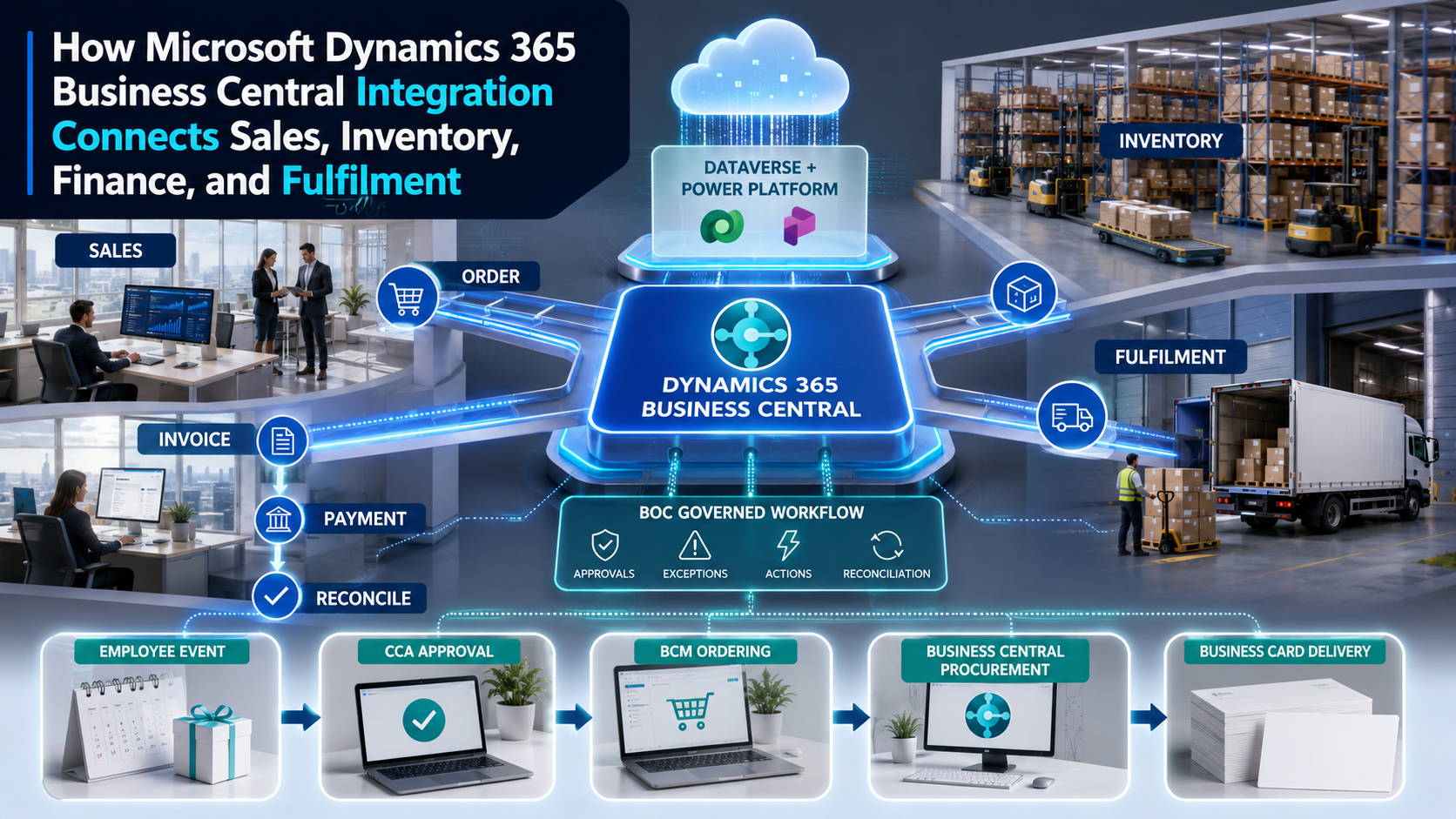
Turning customer demand into governed order execution, financial control, and verified operational outcomes.
Business Central can remain the operational and financial system of record while BOC coordinates the cross-system approvals, fulfilment actions, exceptions, evidence, and reconciliation required to turn sales demand into dependable business outcomes.
Business Central Integration Should Connect The Operating Journey, Not Only The Records
Microsoft Dynamics 365 Business Central brings finance, sales, purchasing, inventory, projects, service, and operations into one business management environment. Yet the customer journey around it is typically distributed. Leads and opportunities may live in Dynamics 365 Sales or another CRM. Orders may originate in ecommerce, EDI, marketplaces, field sales, portals, or subscriptions. Warehouses, carriers, payment providers, banks, tax services, customer support platforms, Microsoft Teams, Power BI, and specialized industry applications contribute essential decisions and events.
An integration project that simply copies records does not resolve the operating problem. The enterprise must preserve a commercial commitment across customer approval, price and credit checks, inventory allocation, picking, shipment, invoicing, payment, and service. Every handoff needs ownership. Exceptions need an authorized response. Every downstream action must be correlated to the source transaction. Completion must be proven by the intended business outcome rather than by a successful API response.
Business Ops Center provides the enterprise workflow governance layer across that journey. Business Central remains authoritative for the operational and accounting records it owns. Dataverse, Microsoft 365, Power Platform, and external applications continue to perform their specialized roles. BOC interprets the events, applies business policy, routes decisions, assigns work, manages exceptions, and preserves evidence until it reconciles and closes the transaction.
Why Business Central Integration Creates A Strong Customer Acquisition Opportunity
Organizations seeking Business Central integration often describe measurable friction: sales orders entered twice, delayed inventory updates, disconnected ecommerce channels, manual purchase requests, shipment exceptions hidden from customer teams, invoices that do not reflect fulfilment, payment data that requires spreadsheet reconciliation, or reporting that arrives after decisions are needed. These are high-intent problems because they affect revenue, working capital, customer experience, and staff capacity.
BOC can turn one of these pain points into a bounded implementation engagement. Discovery identifies the triggering event, systems, source-of-truth rules, approvals, exception types, data classifications, timing needs, and closure evidence. The first release connects one workflow end to end, including monitoring and reconciliation. Later phases can reuse the same identity, security, mapping, and workflow patterns across additional channels, companies, locations, and business processes.
The Connected Business Central Operating Lifecycle
| Business stage | Integration opportunity | Governed outcome |
|---|---|---|
| Customer and sales | Connect CRM, Dataverse, portals, pricing, credit, contacts, and sales quotes. | A qualified, authorized customer commitment with controlled commercial terms. |
| Order validation | Validate company, item, quantity, price, tax, dimensions, location, and availability. | One accepted order without duplicate entry or unauthorized exceptions. |
| Inventory and supply | Coordinate availability, reservation, replenishment, purchasing, transfers, and vendors. | A realistic promise backed by governed inventory and supply decisions. |
| Warehouse and delivery | Connect warehouse execution, 3PLs, carriers, tracking, proof of delivery, and notifications. | Traceable fulfilment with accountable exception resolution. |
| Billing and cash | Connect invoices, tax, gateways, banks, journals, collections, and reconciliation. | Accurate billing and settled cash matched to the intended transaction. |
| Service and returns | Coordinate support, service orders, returns, inspection, replacement, credit, and refund. | Customer and financial closure across the reverse lifecycle. |
| Analytics and assurance | Publish governed metrics and workflow evidence to Power BI and control monitoring. | Decision-ready visibility with source ownership and auditability preserved. |
Connect CRM and Dataverse Without Blurring Data Ownership
Business Central can integrate with Microsoft Dataverse, including scenarios with Microsoft Dynamics 365 Sales and custom Power Apps. Microsoft supports unidirectional or bidirectional synchronization, table mappings, coupled records, and near-real-time business scenarios. A salesperson can create an order in Dynamics 365 Sales and synchronize it to Business Central, while item availability can be surfaced from Business Central back to the sales experience.
The design still needs an ownership model. Sales may own opportunity context and early customer engagement, while Business Central owns posted financial transactions, inventory, and fulfilment. The system must assign an authoritative source to each customer, contact, product, currency, price, and order attribute. BOC can manage ambiguous matches, approval conditions, rejected synchronization, and changes that require human authority. This prevents bidirectional synchronization from becoming uncontrolled overwrite behaviour.
Sales Order Integration Must Protect The Commercial Commitment
Orders may originate from Dynamics 365 Sales, Shopify, WooCommerce, marketplaces, EDI, subscription platforms, partner portals, or industry applications. Before Business Central accepts the order, the workflow should validate customer status, company, item, unit of measure, quantity, price, discount, currency, tax, shipment method, requested date, location, dimensions, payment terms, and credit conditions.
BOC can distinguish a normal order from a decision exception. A low-margin deal, credit exposure, nonstandard payment term, export restriction, unavailable item, or expedited request can trigger the appropriate approval rather than enter a generic error queue. External correlation identifiers and idempotency rules ensure that retries do not create duplicate orders. The source channel receives a business acknowledgement that explains accepted, pending, or rejected status in operational terms.
Inventory and Supply Integration Create a Dependable Fulfilment Promise
A quantity shown as available does not always represent stock that can be promised. Business Central context may include location, variant, unit of measure, reservation, item tracking, demand, transfer, purchase supply, production, safety stock, and lead time. An integration should expose only the availability meaning required by the channel and protect allocation rules across customers, locations, and sales channels.
When the original promise cannot be met, BOC coordinates the response. Operations can approve a split shipment, transfer, substitution, alternate vendor, purchase order, changed date, partial fulfilment, or customer communication. The decision and its evidence stay linked to the sales order. Teams can therefore manage exceptions as business cases instead of passing screenshots and spreadsheets between sales, purchasing, warehouse, and customer service.
Warehouse, Carrier, and Delivery Events Need End-to-End Correlation
Business Central may execute warehouse activities directly or connect to a warehouse business card management system, third-party logistics provider, drop-ship vendor, or carrier. Pick, pack, shipment, tracking, delay, damage, delivery, and return-to-sender events need to update a shared operational case. The status presented to sales and service should describe the customer outcome, not merely the last technical message.
Webhook-driven patterns can notify integrations when supported Business Central entities change. Webhook subscriptions require registration handshakes and renewal, and clients must account for delayed, batched, retried, or collection notifications. BOC can use those notifications as signals, retrieve the authoritative record, apply policy, and route only material exceptions. This avoids making every record update a human task while ensuring consequential changes receive accountable action.
Finance Integration Closes the Loop from Invoice to Reconciled Cash
An invoice should represent what was authorized and fulfilled. Depending on the operating model, invoice creation may follow shipment, milestone, service completion, acceptance, or recurring schedules. Tax services, payment gateways, banks, customer portals, expense tools, and collection platforms may all participate. The integration must preserve relationships between invoice, credit memo, payment, fee, refund, chargeback, journal, and ledger outcome.
Reconciliation is the final business control. A payment authorization is not settlement. A bank deposit may combine transactions or arrive net of fees. A customer may underpay, overpay, deduct, or use the wrong reference. BOC can coordinate cash-application and exception workflows with Business Central context, approval authority, ageing targets, and supporting evidence. Closure occurs when the operational and financial outcomes agree.
Microsoft 365 and Power Platform Can Bring Work into the User’s Flow
Business Central integrations can use Dataverse, Power Automate, Power Apps, Teams, Outlook, Excel, and Power BI to make information and actions accessible within everyday work. A sales manager may approve an exception from Teams, a service user may see fulfilment status without opening the ERP, and executives may view cross-system operational metrics in Power BI. These experiences can reduce friction when they preserve Business Central authority and the BOC workflow record.

Convenience must not weaken governance. Notifications should link to the authoritative task, not create a second approval channel. Power Automate flows should account for connector and webhook behaviour, volumes, retries, collection notifications, permissions, and environment lifecycle. BOC should retain the decision, identity, timestamp, conditions, and downstream result so that an approval in a collaboration surface remains auditable.
Business Card Ordering as a Business Central Procurement Workflow
Business card ordering demonstrates how identity, purchasing, brand governance, production, and finance can be connected without assigning every responsibility to one system. An employee hire, transfer, promotion, name change, location change, or customer-facing role assignment can trigger a candidate request. BOC evaluates eligibility and coordinates the workflow. CCA validates the approved employee identity, title, company, department, location, phone, email, language, brand, and template. BCM converts the approved identity into a controlled production order and tracks fulfilment.
Business Central can provide vendor, item, company, dimension, cost centre, tax, budget, purchase approval, purchase order, receipt, invoice, and payment context. Standard quantities and shipping may proceed within policy. Premium paper, special formats, nonstandard quantities, or expedited shipping can require manager, procurement, brand, or finance approval. Organizations return shipment and delivery status to the same case and reconcile the receipt and supplier invoice with the authorized order.
The architecture preserves clear ownership: the HR system owns workforce identity, CCA governs approved identity and brand, BCM governs ordering and production conversion, Business Central governs procurement and financial records, and BOC governs the cross-system operating journey and its evidence.
Use the Business Central API Stack as the Preferred Integration Surface
Microsoft identifies the Business Central API stack as the preferred integration approach and provides built-in REST APIs with minimal setup. Standard APIs cover common entities, while custom API pages and API queries can expose organization-specific needs through AL. Integrations should use the highest appropriate API version, understand endpoint structure, filter and pagination behaviour, concurrency, companies and environments, and the difference between an API notification and the authoritative record.
Custom APIs should represent stable business contracts rather than expose internal tables indiscriminately. Integrations also need Microsoft Entra ID application registration, least-privilege permissions, secure credentials or certificates, environment separation, throttling strategies, observability, and lifecycle ownership. The technical design should be linked to the business workflow and its service levels.
Common Business Central Integration Failures
The first failure is allowing multiple systems to own the same field without conflict rules. The second is using status labels as if they have universal meaning; released, shipped, invoiced, and closed can represent different business states across applications. Other failures include duplicate order creation, stale inventory promises, webhook subscriptions that expire unnoticed, flows that cannot process collection notifications, unowned synchronization errors, excessive custom APIs, and integrations that report success before the business outcome is reconciled.
BOC addresses these failures by making the operating state explicit. Every workflow has a trigger, source system, correlation identifier, owner, approval policy, exception path, due date, evidence requirement, and closure rule. Technical monitoring remains necessary, but it is connected to customer, inventory, fulfilment, and financial impact.
A Practical Business Central Integration Delivery Roadmap
Begin with one high-value process and baseline its current cycle time, manual work, errors, and exceptions. Map every system, record, owner, approval, data classification, volume, latency need, and evidence requirement. Decide which attributes Business Central owns and which remain authoritative elsewhere. Select standard APIs, custom APIs, Dataverse synchronization, webhooks, Power Automate, or batch patterns according to the operating contract.
The first release should include authentication, idempotency, monitoring, exception routing, and reconciliation. Test duplicate events, timeouts, stale inventory, blocked customers, credit failure, rejected prices, partial shipments, cancellations, returns, permission problems, expired subscriptions, collection notifications, and manual overrides. Establish production ownership and measure order-entry reduction, cycle time, fulfilment accuracy, exception ageing, invoice accuracy, unapplied cash, and percentage of outcomes reconciled.
How BOC Converts Business Central Integration into Measurable Value
BOC does not replace Business Central, Dataverse, Power Platform, Microsoft 365, or specialized operational systems. It governs the work between them: context, approval, assignment, exception, evidence, and closure. This gives prospective customers a practical starting point. They can solve one visible integration problem without committing to an uncontrolled enterprise-wide rewrite.
A BOC discovery engagement can deliver the target workflow, source-of-truth matrix, integration architecture, security model, exception taxonomy, implementation backlog, and measurement plan. Implementation then connects the selected applications in controlled phases. The result is a reusable integration foundation that turns sales demand into inventory action, fulfilment, billing, cash, and trusted operational closure.
Questions Enterprise Buyers Should Ask
- Which system owns each customer, product, order, inventory, fulfilment, invoice, payment, and service attribute?
- Should this requirement use standard APIs, custom APIs, Dataverse synchronization, webhooks, Power Automate, or a controlled batch?
- How will duplicate, delayed, batched, reversed, and out-of-order events be handled?
- Which approvals and segregation-of-duties controls must remain enforceable across applications?
- Who renews subscriptions, monitors integration health, resolves errors, and reconciles business outcomes?
- Can the first workflow pattern be reused across companies, locations, channels, and future integrations?
Turn one Business Central handoff into a connected, governed operating outcome. Business Ops Center can map the process, define the source-of-truth and integration architecture, connect Business Central with the required Microsoft and external applications, and implement approvals, exception handling, evidence, and reconciliation. Start with one high-friction workflow and build a reusable foundation from it.