
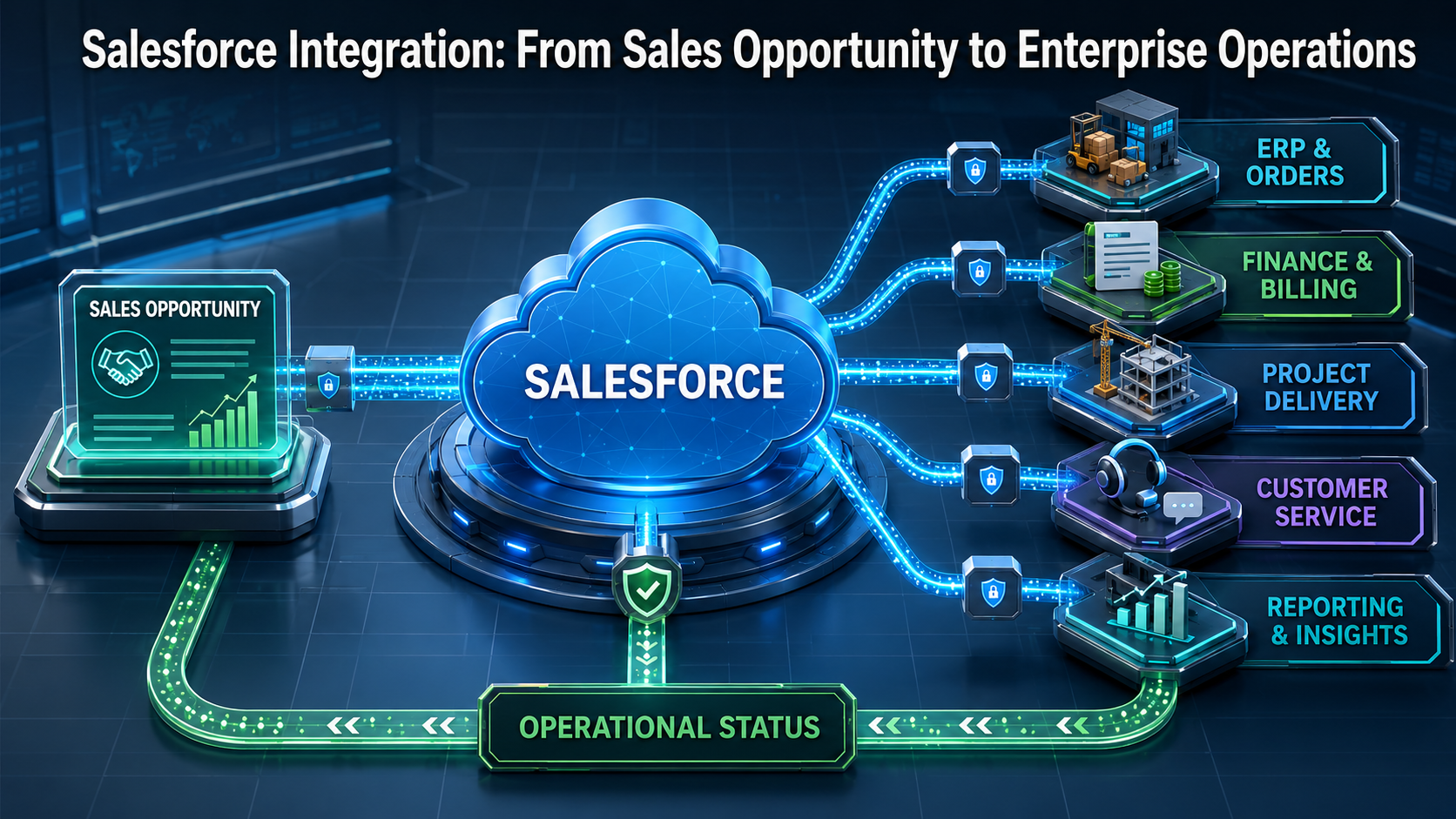
| EXECUTIVE PREMISE: Salesforce creates its greatest operational value when a qualified opportunity, approved quote, closed deal, customer request, or account change becomes a governed business event that can coordinate delivery across finance, ERP, service, project, fulfillment, identity, and reporting systems. |
Salesforce Should Be The Beginning of The Workflow, Not The End of It
Salesforce gives sales teams a structured environment for managing leads, accounts, contacts, opportunities, products, quotes, activities, forecasts, and customer relationships. Yet revenue is not created by a CRM status alone. A closed opportunity must normally trigger work across several operational systems: customer setup, contract validation, credit review, project creation, inventory allocation, order processing, invoicing, service onboarding, access provisioning, reporting, and executive visibility.
When Salesforce remains isolated, teams bridge these steps through email, spreadsheets, duplicate entry, chat messages, and personal follow-up. Sales may believe a deal is ready while finance is waiting for billing data. Delivery may begin without the final scope. Customer success may not know which commitments were made. Operations may receive incomplete product, location, or implementation details. The customer experiences delay even though the opportunity was marked successful.
Salesforce integration closes this execution gap. It allows important CRM events to initiate controlled workflows in the systems that perform the work. The objective is not to copy every Salesforce field everywhere. It is to translate a commercial decision into a coordinated operational lifecycle with clear ownership, approved data, exception handling, and evidence of completion.
What Salesforce Integration Means for Business Operations
A useful Salesforce integration connects business intent with downstream action. It determines which event should initiate work, which data is authoritative, what validation is required, which systems must participate, and how completion returns to Salesforce. The integration should preserve the relationship between the opportunity and every operational record created from it.
This distinction matters because data synchronization and process integration solve different problems. Synchronization keeps selected records aligned. Process integration coordinates a business outcome across applications. A customer address update may require simple synchronization. A closed opportunity may require a multi-stage process involving approvals, provisioning, procurement, service delivery, billing, and customer communication.
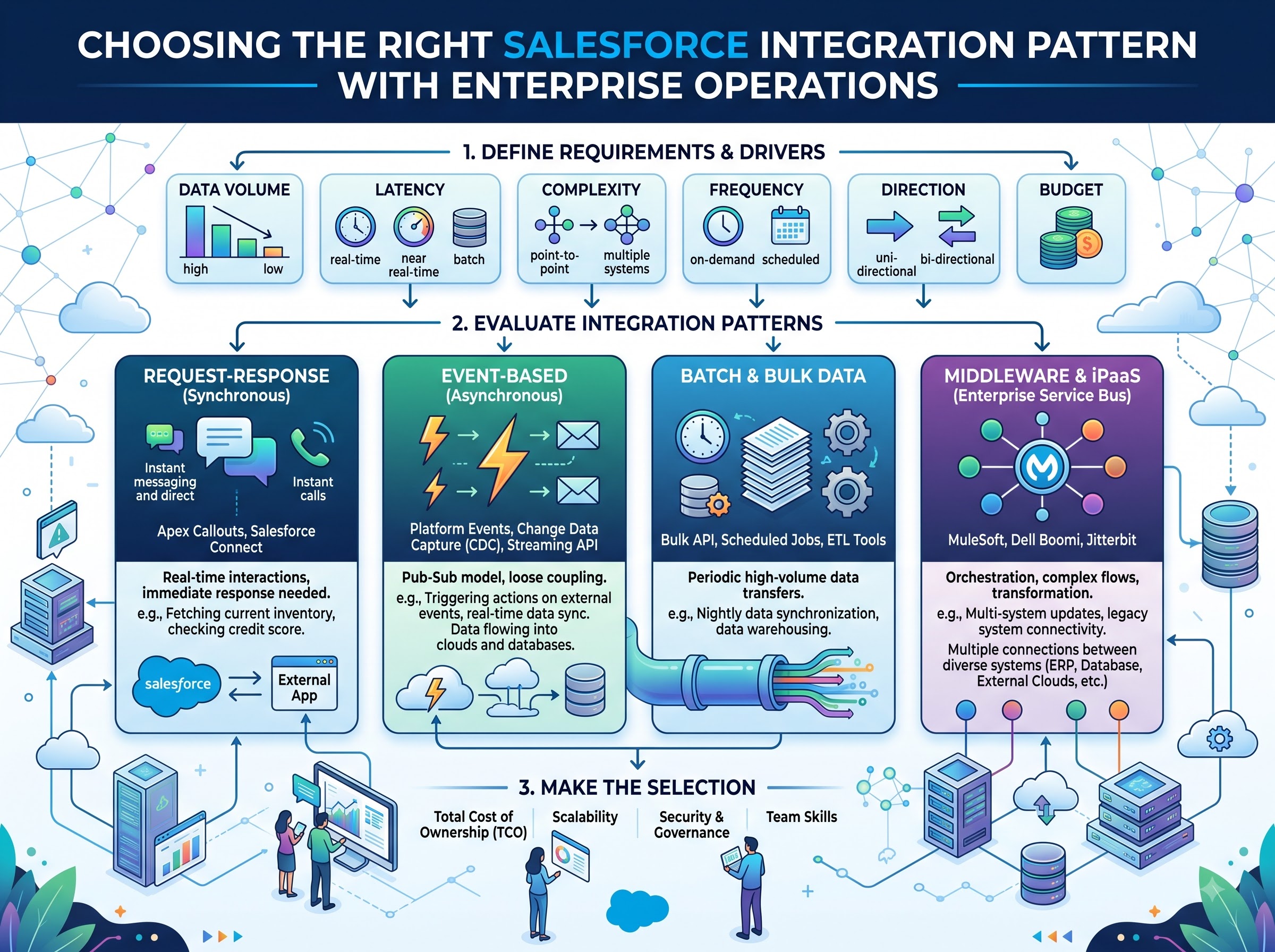
Salesforce documents several established integration patterns, including synchronous request-and-reply, asynchronous fire-and-forget, batch data synchronization, remote call-in, and event-based approaches. The correct choice depends on urgency, transaction volume, dependency, failure tolerance, and whether the originating user must wait for an immediate result. BOC applies these technical choices within a broader enterprise operational analytics model so the enterprise can control what the integration is expected to accomplish.
High-Value Salesforce Integration Opportunities
The strongest integration projects start with a measurable business handoff rather than a general ambition to connect systems. The following opportunities frequently produce visible gains in speed, accuracy, customer experience, and management control.
| Salesforce event | Connected operational systems | Business outcome |
|---|---|---|
| Qualified opportunity | ERP, pricing, inventory, approval | Validate feasibility and commercial readiness |
| Quote or proposal approval | Finance, legal, contract repository | Release only approved commercial terms |
| Closed-won opportunity | ERP, project, service, billing | Create an accountable delivery lifecycle |
| New or changed account | Master data, finance, support | Maintain a trusted customer record |
| Product or scope change | Delivery, procurement, billing | Control post-sale commitment changes |
| Customer case or escalation | Service management, engineering | Coordinate resolution and customer communication |
| Renewal or expansion | Usage, finance, customer success | Act on risk and growth signals |
1. Salesforce-to-ERP Integration
A Salesforce-to-ERP integration connects commercial commitments with the system responsible for orders, inventory, finance, and fulfillment. When an opportunity reaches an approved stage, the workflow can validate customer master data, product codes, tax information, payment terms, currencies, legal entities, and fulfillment requirements before creating the ERP transaction.
The most important design question is not which fields map between Salesforce and the ERP. It is which system owns each business fact. Salesforce may own opportunity context and sales activity, while the ERP owns financial customer status, product availability, tax treatment, and invoice history. The integration should respect these boundaries and return operational status to Salesforce without creating two competing sources of truth.
2. Salesforce-to-Finance and Billing Integration
Closed business often needs to become billable business. Integration can create billing accounts, subscriptions, invoices, payment schedules, or revenue-operation tasks from approved Salesforce data. It can also return invoice status, payment risk, or account balance information to the appropriate Salesforce view so commercial teams understand the financial state of the customer relationship.
Controls are essential. A salesperson should not be able to change billing-sensitive data after approval without a governed review. Duplicate opportunity events must not generate duplicate invoices. Currency, tax, discount, and payment-term changes should follow explicit authority. The workflow must distinguish technical acceptance from financially valid completion.
3. Salesforce-to-Project and Service Delivery Integration
For professional services, implementation, managed services, and complex products, a closed opportunity must become a structured delivery plan. Salesforce integration can create a project, implementation case, service order, or onboarding workspace with the approved scope, customer stakeholders, milestones, locations, products, dependencies, and target dates.
This handoff should not transfer free-form sales notes as if they were an executable specification. BOC can introduce readiness checks and enterprise approval workflow gates before delivery begins. Missing scope, resource assumptions, security requirements, customer responsibilities, or acceptance criteria should become visible exceptions rather than problems discovered after kickoff.
4. Salesforce-to-Customer Support Integration
Connecting Salesforce sales and account data with service management gives support teams the context needed to respond correctly. Entitlements, service levels, products, locations, contract dates, implementation status, and named stakeholders can be synchronized or made available when a case is created. Significant escalations can return to Salesforce so account owners see customer risk without relying on separate status meetings.
The design must protect confidential notes and avoid flooding Salesforce with low-value technical activity. Integration should surface the information needed for a commercial or operational decision: severity, customer impact, owner, next milestone, unresolved dependency, and expected resolution.
5. Salesforce-to-Marketing and Customer Lifecycle Integration
Salesforce events can coordinate marketing journeys, onboarding communication, renewal programs, and customer education. Lead qualification, consent status, customer segment, product adoption, contract timing, or service milestones may determine which communication is appropriate. The integration must preserve consent, suppression, jurisdiction, and communication preference rules rather than treating every CRM change as permission to send a message.
6. Salesforce-to-Identity and Access Workflows
Certain customer, partner, or employee-facing sales processes require digital access. An approved contract or onboarding milestone may initiate portal access, partner community membership, application provisioning, or role changes. Because access carries security risk, the workflow should verify identity, authority, effective dates, least-privilege requirements, and termination conditions before provisioning occurs.
BOC can coordinate the operational state while identity systems remain authoritative for authentication and access enforcement. This keeps sales activity connected to provisioning without allowing the CRM to become an uncontrolled identity authority.
A Governed Opportunity-to-Operations Workflow
A well-designed HubSpot vs Salesforce integration follows a controlled lifecycle. The stages below are deliberately business-oriented. They define when work is ready, not merely when a record changes.
- Detect the meaningful Salesforce event. Identify the exact opportunity stage, approval, quote status, case condition, or account change that should initiate evaluation.
- Validate operational readiness. Confirm required fields, customer identity, products, pricing, scope, dates, legal entity, ownership, and approvals.
- Enrich with authoritative information. Retrieve finance, ERP, inventory, contract, identity, or service data needed for the decision.
- Route exceptions before execution. Send incomplete, conflicting, high-risk, or nonstandard conditions to an accountable owner.
- Create downstream work. Generate only the approved order, project, invoice, service request, account, or provisioning action.
- Return status to Salesforce. Give sales and account teams meaningful operational visibility without duplicating every downstream detail.
- Reconcile the outcome. Confirm that the operational systems produced what Salesforce authorized and close only with evidence.
| INTEGRATION PRINCIPLE: A Salesforce stage change should not automatically become an irreversible downstream action. It should become an evaluated business event with readiness checks, authority, exception handling, and a verifiable result. |
Choosing the Right Salesforce Integration Pattern
No single pattern fits every workflow. Synchronous APIs are useful when a user requires an immediate response, such as validating an account or retrieving current availability. Asynchronous messaging is better when the downstream process can continue independently or may take time. Batch interfaces remain appropriate for high-volume periodic synchronization, migration, and reporting. Event-driven approaches are valuable when applications need to react to business events or record changes without continuous polling.
Salesforce Pub/Sub API supports publishing and subscribing to platform events, Change Data Capture events, and real-time event monitoring events through one interface. Salesforce also supports REST, SOAP, Bulk, and other integration capabilities. Technology selection should follow the operational requirement, expected volume, latency, error-recovery model, security boundary, and maintainability—not platform fashion.
Event consumers must be designed for replay, duplicates, centralized business card ordering assumptions, and outage recovery. Salesforce retains platform events and Change Data Capture events on its event bus for a defined retention window, so external consumers need durable processing state and a plan for interruptions that exceed that window. Every integration should include monitoring, retry policies, dead-letter handling, reconciliation, and operational ownership.
Data Ownership and the Customer Record
Integration programs frequently fail because they treat every connected application as an equal owner of customer data. The enterprise should define authority at the field or business-concept level. Salesforce may be authoritative for opportunity stage and relationship ownership. An ERP may be authoritative for credit status and invoice balance. A master data platform may own legal customer identity. A support platform may own case resolution. An identity platform may own access state.
BOC uses these authority decisions to control movement and conflict resolution. If two systems disagree, the workflow should not simply apply the most recent timestamp. It should identify the authoritative source, determine whether an approved change is pending, and route material conflicts for resolution. This protects the organization from silent overwrites and unreliable reporting.
Security, Governance, and Compliance
Salesforce integration expands the operational reach of CRM data, so access must be designed deliberately. Dedicated integration identities, least-privilege permissions, secure credential handling, transport encryption, API controls, audit logging, and environment separation should be part of the architecture. Sensitive fields should move only when the receiving process requires them.
Governance must also address business authority. Who may approve a discount, release an order, modify a contract date, override a credit restriction, or initiate customer access? Technical permission to update a field is not the same as business authority to trigger an outcome. BOC connects these decisions to accountable roles and preserves the evidence needed to explain the action later.
Common Salesforce Integration Failures
Many integration problems are predictable. Organizations can reduce rework by addressing them during design rather than after launch.
- Automating an opportunity stage without defining operational readiness criteria.
- Creating point-to-point connections that duplicate transformation and exception logic.
- Allowing bidirectional updates without clear field ownership or conflict rules.
- Assuming a successful API response proves that the business outcome is complete.
- Ignoring duplicate events, partial completion, replay, and out-of-order processing.
- Sending every downstream status into Salesforce and overwhelming users with technical noise.
- Using individual user credentials or excessive permissions for integration activity.
- Launching without reconciliation, support ownership, monitoring, and change governance.
How BOC Supports Salesforce Integration Customers
Business Ops Center approaches Salesforce integration as an operational improvement program, not a connector installation. The engagement begins by identifying the revenue or customer workflow that creates the greatest friction: opportunity-to-order, quote-to-contract, sale-to-project, customer-to-billing, case-to-resolution, renewal-to-action, or another cross-system lifecycle.
BOC then maps the business event, source-of-truth decisions, required data, approvals, target systems, exception paths, status visibility, reconciliation evidence, and ownership model. This creates an integration blueprint that both business and technical teams can understand. The blueprint can guide native automation, middleware, iPaaS, custom API development, event-driven architecture, or a blended approach.
Implementation success is measured through business outcomes: reduced handoff time, fewer duplicate entries, improved readiness, faster order or project creation, fewer billing corrections, better exception visibility, and more reliable customer commitments. The result is a connected operating process rather than another interface that moves data without accountability.
A Practical Starting Point
Begin with one high-value Salesforce event and trace what happens after it. If an opportunity becomes closed-won, list every manual email, spreadsheet update, approval, system entry, status request, correction, and customer delay that follows. Identify where information is rekeyed, where ownership becomes unclear, and where teams cannot see whether the next step occurred.
That map will reveal the integration opportunity. The first release should automate a controlled, measurable slice of the lifecycle while preserving visibility and exception handling. Once the pattern is stable, the enterprise can extend it to additional products, regions, customer segments, or systems without rebuilding governance from the beginning.
Connect Salesforce Momentum to Operational Execution
Salesforce can show where revenue is developing and which customer commitments have been made. Integration determines whether those commitments become accurate, timely, and accountable operations. By connecting Salesforce to ERP, finance, billing, projects, service, marketing, identity, and reporting, organizations can reduce the delay between commercial decision and business execution.
The greatest value comes from more than connectivity. It comes from a governed workflow that validates readiness, applies authority, coordinates action, manages exceptions, returns useful status, and reconciles the final outcome. That is how Salesforce becomes part of a connected operating system rather than an isolated record of sales activity.
| If your team closes opportunities in Salesforce but still relies on email, spreadsheets, duplicate entry, or manual follow-up to create orders, projects, invoices, access, or service work, BOC can map and implement the integration workflow. Start with one high-value opportunity-to-operations process and turn it into a controlled, measurable customer lifecycle. |