


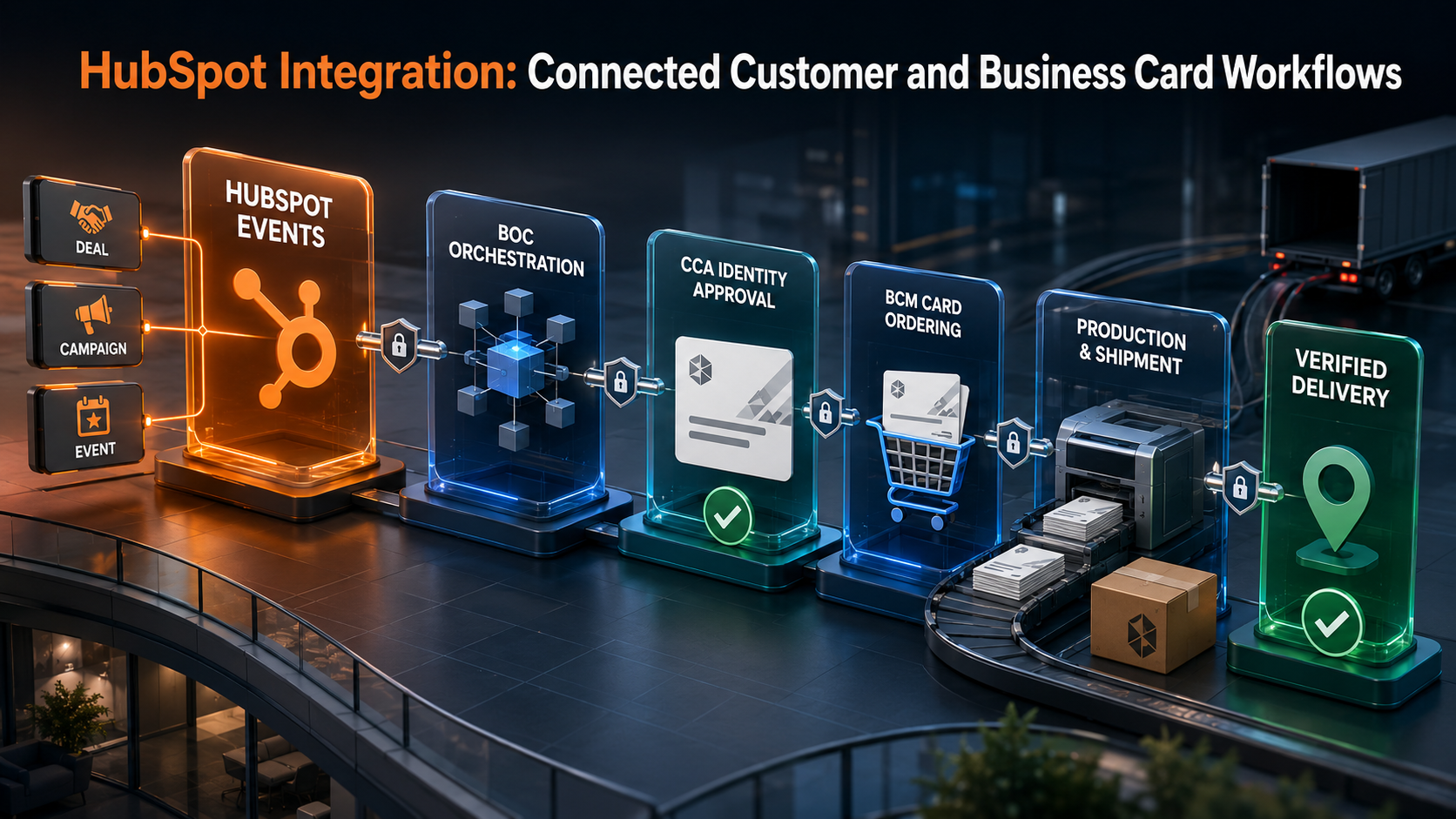
| EXECUTIVE PREMISE: HubSpot becomes more valuable when a lead, deal, company, campaign, or onboarding milestone can initiate controlled work beyond the CRM. BOC connects those events to operational systems; CCA protects approved identity and brand standards; and BCM converts approved specifications into accountable business card ordering and fulfillment. |
A Customer Journey Cannot Stop at the CRM Boundary
HubSpot helps organizations manage marketing engagement, contacts, companies, leads, deals, tickets, products, quotes, activities, and customer communication. It can provide a clear view of how a relationship develops from first interest to commercial commitment. Yet the customer experience is delivered through many systems and teams that sit beyond the CRM: finance, project delivery, service management, ecommerce, events, identity, procurement, billing, collaboration, and physical fulfillment.
When those systems remain disconnected, a successful sales handoff produces manual work. Teams copy company details into finance software, create project records from email, request customer onboarding through chat, rebuild campaign lists, and search for the latest approved information. The CRM shows momentum while downstream execution waits for someone to interpret the deal and coordinate the next steps.
HubSpot integration solves this problem by turning meaningful CRM events into governed operational workflows. The goal is not indiscriminate data copying. It is to recognize the business event, validate readiness, route approvals, create the correct downstream work, return useful status to HubSpot, and preserve evidence that the intended customer outcome was completed.
What a Connected Lead-To-Customer Workflow Looks Like
A connected workflow follows the commercial relationship while allowing each system to remain authoritative for the information it owns. HubSpot may own lifecycle stage, marketing engagement, deal context, and relationship activity. Finance may own credit status and invoices. A project platform may own delivery milestones. A service platform may own case resolution. CCA may govern approved identity and brand rules, while BOC manages business card ordering, vendor execution, and fulfillment.
BOC coordinates the lifecycle between these systems. It carries the persistent business context, evaluates whether the event is ready for action, sends nonstandard conditions to accountable owners, and reconciles execution against the approved request. This allows automation to move quickly without allowing one CRM field change to become an uncontrolled commitment.
| HubSpot event | Connected process | Operational outcome |
|---|---|---|
| Lead reaches qualification | Enrichment, routing, ownership | The right team receives a complete, prioritized lead |
| Deal reaches approved stage | Finance, legal, delivery readiness | Only operationally ready commitments proceed |
| Deal becomes closed-won | Project, billing, onboarding | Customer execution begins without duplicate entry |
| Company or contact changes | Master data and communication | Authorized customer information remains aligned |
| Event or campaign is approved | Event operations and collateral | Participants and materials are prepared on time |
| Card request is initiated | CCA governance and BCM ordering | Approved business cards reach the right recipient |
| Ticket reaches escalation | Service, engineering, account team | Customer impact is coordinated and visible |
High-Value HubSpot Integration Opportunities
1. Lead Qualification and Routing
HubSpot can capture interest from forms, campaigns, events, referrals, conversations, and sales activity. Integration can enrich the record with firmographic, account, territory, eligibility, or product information before the lead is assigned. The workflow can then route the lead by geography, segment, industry, product, customer status, or service capability while documenting why that routing decision occurred.
The integration should also handle uncertainty. Duplicate contacts, incomplete consent, conflicting company associations, missing ownership, or a request outside the supported market should not enter the normal sales queue as if the data were complete. BOC can make these exceptions visible and measurable rather than allowing them to become silent CRM quality problems.
2. Deal-to-Finance and Billing Integration
When a deal reaches an approved stage, HubSpot integration can validate billing entities, commercial terms, currency, taxation, payment conditions, products, discounts, and customer identifiers before creating work in finance or billing systems. Invoice or payment status can return to the correct HubSpot view so account owners understand the operational state without gaining inappropriate access to financial detail.
A successful API response is not enough. The workflow must prevent duplicate account or invoice creation, control changes after approval, and reconcile the financial record with the authorized deal. High-risk discounts, unusual payment terms, or incomplete tax information should be routed for review before downstream execution.
3. Deal-to-Project and Customer Onboarding Integration
Closed-won deals often need to create projects, implementation workspaces, service plans, onboarding checklists, customer portals, or internal collaboration channels. Integration can transfer the approved scope, products, milestones, stakeholders, dependencies, locations, target dates, and service obligations into the platform that will deliver the work.
BOC should evaluate onboarding readiness instead of treating every closed-won event as complete. Missing scope, unconfirmed stakeholders, security requirements, customer prerequisites, resource assumptions, or acceptance criteria should pause or redirect the workflow. This protects delivery teams from inheriting ambiguous commitments and gives sales teams a visible path to correction.
4. HubSpot-to-Service and Customer Success Integration
Connecting HubSpot with ticketing, service management, product usage, and customer success systems creates a more complete relationship view. Account teams can see meaningful onboarding progress, service risk, adoption milestones, renewal readiness, or material escalations. Service teams can receive contract, entitlement, product, and stakeholder context without asking the customer to repeat information.
The integration should publish decision-ready status rather than every technical event. Severity, customer impact, accountable owner, next milestone, service obligation, and expected resolution are more useful to commercial teams than a stream of internal logs. Sensitive support or engineering notes should remain protected within their authoritative systems.
Business Card Ordering as a Connected HubSpot Workflow
Business card ordering may appear separate from CRM integration, but it often intersects directly with revenue activity, events, partner programs, customer-facing team changes, and onboarding. A new field sales representative may need approved cards before meeting prospects. An event campaign may require cards for a temporary team or newly assigned territory. A partner launch may require customer-facing representatives to receive co-governed identity materials. A merger, office move, title change, or brand update may affect both HubSpot ownership records and physical business identity.
Without integration, these requirements are handled through email and spreadsheets. Marketing confirms the event, sales supplies names, HR or managers verify titles, brand teams check templates, procurement handles vendors, and recipients ask for status. Orders can be duplicated, delayed, produced from unapproved information, or shipped to outdated locations. The organization cannot easily connect the card order to the campaign, territory, partner initiative, or customer-facing responsibility that created the need.
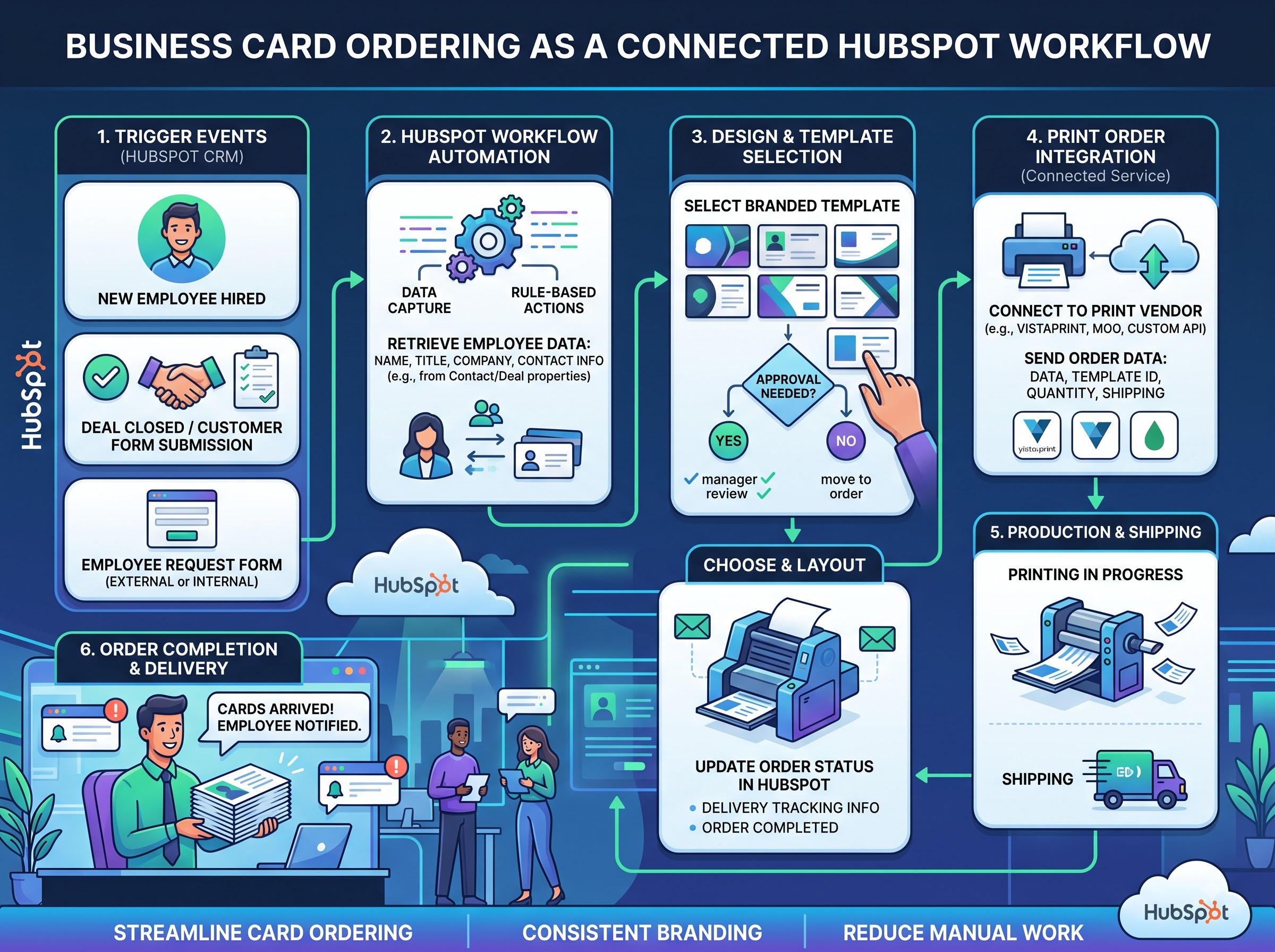
A HubSpot-connected ordering workflow allows an approved CRM event to initiate—not automatically authorize—a business card request. HubSpot can contribute the relevant operational context, such as campaign, event, territory, company, deal team, partner program, office, or customer-facing role. BOC enterprise process orchestration is the request and checks readiness. CCA validates approved identity, title, contact details, brand template, policy, and authority. BCM converts the approved specification into an order, coordinates the supplier, tracks production and shipment, and returns status to the originating workflow.
The Governed HubSpot-to-Business-Card Lifecycle
- Trigger the request from an approved business event. Examples include event staffing, a new customer-facing assignment, partner onboarding, territory activation, or an authorized profile change.
- Resolve the person and business context. Match the request to the correct employee, contractor, partner representative, office, team, campaign, and delivery location.
- Validate authority and source data. Confirm which system is authoritative for legal name, preferred display name, role, title, phone, email, entity, and location.
- Apply CCA governance. Select the permitted card template, brand variant, language, legal text, contact fields, and approval path for the person and context.
- Approve quantity, cost, and fulfillment. Evaluate event timing, inventory, budget owner, shipping option, vendor, and any expedited-order exception.
- Release the approved specification to BCM. BCM creates and tracks the order without allowing unapproved data to change during production.
- Return meaningful status. HubSpot or the relevant BOC view can show requested, awaiting approval, ordered, shipped, delivered, rejected, or exception—without exposing unnecessary production detail.
- Reconcile delivery. Confirm that the recipient received the quantity and specification that were approved, and retain evidence for reporting and reorders.
| ORDERING CONTROL PRINCIPLE: HubSpot can identify the commercial or campaign event that creates demand for business cards, but it should not become the authority for printed identity. BOC coordinates the lifecycle, CCA governs what may be represented, and BCM executes the approved order. |
Business Card Ordering Use Cases Connected to HubSpot
Event and Campaign Readiness
When a HubSpot campaign or marketing event reaches an approved readiness stage, the workflow can identify participating customer-facing team members and check whether each person has current, approved business cards. Existing inventory, recent orders, title changes, office changes, and shipping deadlines can be evaluated before creating new demand. Exceptions such as a missing brand approval or late participant addition can be routed immediately.
Sales Territory and Account-Team Changes
A territory activation or account-team reassignment may change the office, phone number, regional brand variant, language, or customer-facing title required on a card. The workflow can compare the proposed representation with authoritative identity and organizational records before releasing an order. This prevents a sales administration change from silently creating an incorrect printed identity.
Partner and Channel Programs
HubSpot may track partner companies, partner contacts, joint campaigns, and channel deals. Where the organization permits partner-facing cards or co-branded materials, the integration can route the request through specific partner, legal, and brand approvals. The partner relationship creates the demand; the continuous operational governance model determines whether and how the identity may be represented.
Reorders and Replacement Requests
A reorder should not blindly reproduce an old design. The workflow should revalidate current title, contact information, entity, template, policy, location, and recipient eligibility. If nothing material has changed, the process can proceed quickly. If a relevant change exists, the request should return to the appropriate approval path before production.
Choosing the HubSpot Integration Method
HubSpot provides APIs for CRM objects and associations, along with webhook capabilities that can notify an integration when subscribed events occur. Webhooks can be more scalable than repeatedly polling for changes, but the design must still retrieve authoritative details, validate signatures and scopes, handle retries or duplicates, and preserve processing state. Workflow-based webhook actions may also suit specific account configurations and subscription tiers.
Authentication should match the distribution model. Multi-customer applications generally use OAuth and request only the scopes required for the use case. Account-specific system integrations may use the current HubSpot mechanisms intended for that environment. Because HubSpot platform capabilities and authentication options evolve, implementation should follow the current official developer documentation and avoid embedding credentials in user-facing code or logs.
BOC selects the integration method after defining the operational requirement: which event matters, how quickly another system must respond, what volume is expected, whether a human decision may pause the process, how failure is recovered, and what evidence proves completion. Architecture should serve the workflow rather than forcing the workflow into the easiest connector.
Data Ownership, Consent, and Identity Governance
HubSpot often contains rich relationship information, but not every CRM field should be treated as authoritative. The organization must define ownership for company identity, customer contact data, consent, employee identity, title, legal entity, billing information, service entitlement, and printed brand representation. The most recently edited value is not necessarily the approved value.
Consent and communication rules deserve particular care. Marketing engagement, subscription status, privacy preferences, and jurisdictional obligations must remain visible when data moves between HubSpot and external platforms. For business card ordering, customer and campaign context can justify the operational request, while employee identity and printed content should come from approved organizational sources under CCA governance.
Common Integration Failures to Avoid
- Triggering downstream work from a lifecycle or deal stage without readiness criteria.
- Copying every HubSpot property into every connected system without an ownership model.
- Using contact or company associations without resolving duplicates and conflicting relationships.
- Treating webhook delivery as proof that the downstream business outcome completed.
- Creating card orders directly from unverified CRM names, titles, phone numbers, or addresses.
- Failing to lock the approved card specification before vendor production begins.
- Ignoring retry, duplicate-event, partial-completion, and reconciliation requirements.
- Returning too much technical detail to HubSpot and obscuring the status users actually need.
- Launching without support ownership, monitoring, data-retention rules, and change governance.
How BOC Turns HubSpot Integration Into A Customer Outcome
Business Ops Center begins with the handoff that creates measurable friction. That may be lead-to-owner, deal-to-billing, sale-to-project, event-to-business-card order, partner-to-approval, ticket-to-escalation, or renewal-to-customer-success action. BOC maps the business event, authoritative sources, approvals, target systems, exceptions, status model, service expectations, and reconciliation evidence.
The resulting blueprint can guide native HubSpot automation, APIs, webhooks, integration platforms, middleware, or custom development. For business card ordering, it also defines the boundary between HubSpot context, BOC orchestration, CCA authority, and BCM execution. Each platform performs a distinct role, preventing the CRM from becoming an uncontrolled ordering or identity system.
Implementation is measured through business outcomes: faster lead response, fewer duplicate records, shorter onboarding time, improved event readiness, fewer billing corrections, controlled business card orders, better delivery visibility, and less manual follow-up. This commercial focus makes the integration easier for operational leaders to sponsor and evaluate.
Start With One HubSpot Event
Choose one event that currently produces multiple manual handoffs. Trace every email, spreadsheet, approval, rekeyed record, status request, supplier communication, and correction that follows. If the event is an upcoming campaign or conference, include the process for confirming participants, validating card details, approving quantities, ordering, shipping, and verifying delivery.
The first implementation should automate a controlled portion of that lifecycle while preserving exceptions and human judgment. Once the event, authority, and evidence model are stable, BOC can extend the same pattern to additional teams, regions, campaigns, customer segments, and operational systems.
Connect HubSpot Engagement to Governed Execution
HubSpot can show who is engaging, which companies are progressing, which deals are advancing, and which customers need attention. Integration turns those signals into coordinated work. BOC connects the CRM event to the systems and teams responsible for delivering the outcome, while keeping authority, exceptions, status, and evidence visible throughout the lifecycle.
Business card ordering demonstrates why this operating model matters. The demand may originate in a campaign, event, territory, partner, or customer-facing assignment tracked in HubSpot. But the printed identity must still be verified, approved, executed, and reconciled. By connecting HubSpot with BOC, CCA, and BCM, the enterprise gains both commercial speed and operational control.
| If your HubSpot deals, campaigns, events, or customer onboarding activities still lead to email-based handoffs—or if business card ordering depends on spreadsheets and manual follow-up—BOC can map and implement a connected workflow. Start with one high-value HubSpot event and turn it into a governed, measurable customer and ordering lifecycle. |