
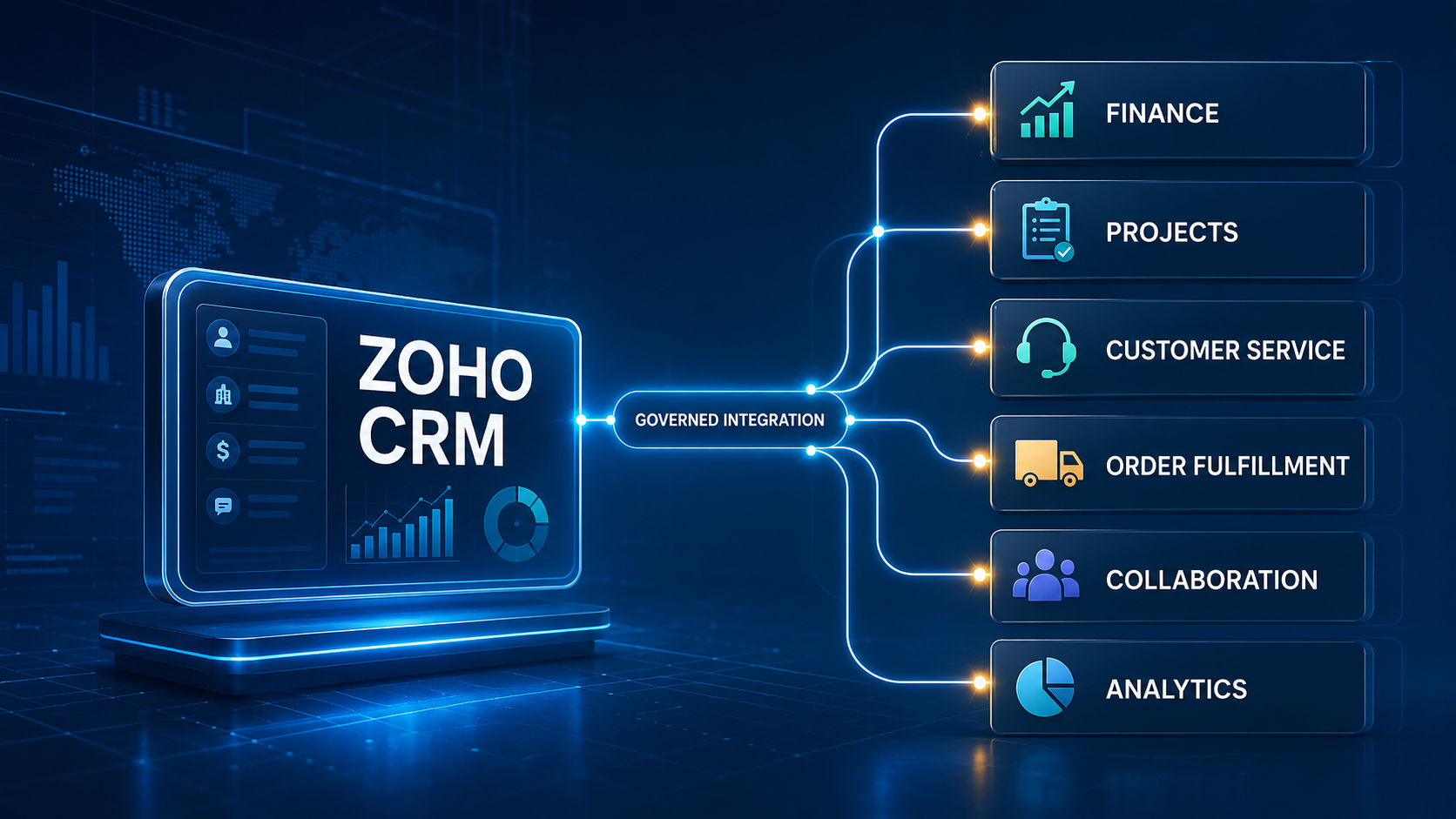
Turn CRM milestones into governed, trackable action across finance, projects, service, fulfillment, collaboration, and analytics.
| EXECUTIVE PREMISE: Zoho CRM becomes more valuable when a qualified lead, approved quote, closed deal, customer change, or service issue can initiate the right downstream work—without copying data, losing ownership, or bypassing business controls. |
The CRM Should Be A Starting Point, Not A Stopping Point
A customer relationship management system can tell a sales team what is happening in the pipeline. It does not automatically ensure that finance receives accurate billing data, delivery teams receive a complete scope, support sees the customer context, fulfillment acts on the correct order, or leadership can reconcile the commercial promise with the operating result.
That gap is where many growing organizations lose momentum. A deal moves to the next stage in Zoho CRM, then the real work continues through email, spreadsheets, chat messages, and rekeyed records. Each handoff introduces delay and ambiguity. Teams begin asking familiar questions: Which system has the current customer name? Was the discount approved? Did the project get created? Was the invoice sent? Who owns the exception?
A well-designed Zoho CRM integration strategy replaces those informal handoffs with governed events. Zoho CRM remains the commercial system of engagement, while connected applications perform the specialized work they were designed to do. Business Ops Center (BOC) coordinates the rules, approvals, evidence, exceptions, and outcome tracking that make the connected process dependable.
What a High-Value Zoho CRM Integration Looks Like
The goal is not to synchronize every field everywhere. The goal is to connect business moments that have a clear operational consequence. Each integration should define a trigger, validate required data, identify the authoritative system, create or update the downstream object, return a durable reference, and make failures visible to an accountable owner.
| CRM moment | Connected action | Primary system | Control question |
|---|---|---|---|
| Lead qualified | Enrich, route, and assign follow-up | Zoho CRM | Are owner and response time clear? |
| Quote approved | Create order or billing-ready record | Finance / ERP | Are price, tax, and terms authorized? |
| Deal closed-won | Launch project and customer onboarding | Project system | Is the delivery package complete? |
| Customer activated | Create support entitlement and context | Service desk | What support level was promised? |
| Order released | Reserve, produce, or fulfill | Inventory/fulfillment | Can status be reconciled end to end? |
| Material change | Update governed master data | System of record | Which system is authoritative? |
| Outcome posted | Refresh operating and revenue views | Analytics platform | Do reports use consistent definitions? |
1. Connect Zoho CRM to Finance and Accounting
A closed deal is not yet recognized revenue, and a CRM quote is not automatically an invoice-ready transaction. Finance needs the legal customer, billing address, tax treatment, currency, payment terms, product or service lines, quantities, approved discounts, purchase-order details, and the date on which billing is allowed to begin.
An integration with Zoho Books or another accounting platform can create or update the customer, translate approved commercial lines, and establish a billing record only after required controls are satisfied. The accounting application should own invoices, payments, credits, and financial status. Zoho CRM should receive the references and summarized state that sales and account teams need—without trying to become the ledger.
- Validate customer identity and required billing fields before creating financial records.
- Prevent duplicate customers by matching on governed identifiers, not names alone.
- Keep pricing and discount approval evidence with the commercial transaction.
- Return invoice, payment, or hold status to CRM at an appropriate summary level.
| BOC OPPORTUNITY: BOC can govern the release decision between sales and finance, route exceptions, preserve approval evidence, and verify that the financial record was accepted rather than assuming success after an API request. |
2. Connect Zoho CRM to Project Delivery
The handoff from sales to delivery is one of the most consequential transitions in the customer lifecycle. When a deal closes, a Zoho Projects workspace or another delivery record can be created with the approved scope, milestones, start assumptions, stakeholders, sold services, commercial constraints, and source-deal reference.
Automation should not copy a loosely written opportunity into a project and declare the handoff complete. It should check whether the scope is approved, identify missing delivery inputs, assign an accountable project owner, and distinguish standard work from engagements requiring review. The new project identifier and onboarding status should return to Zoho CRM, so the account team can see progress without maintaining a parallel status narrative.
This is also where expectation management improves. Delivery can see exactly what was sold; sales can see whether prerequisites are blocked; leadership can compare forecast, booked value, delivery readiness, and realized outcome using linked records.
3. Connect Zoho CRM to Customer Service
Zoho Desk or another service platform needs more than a contact name. It may need the correct account, active products, entitlement, support tier, implementation phase, region, priority rules, and responsible customer team. Integration can create that context when the customer becomes eligible for support and keep selected account attributes aligned over time.
The service desk should remain the system of record for tickets, service-level timers, queues, resolutions, and support knowledge. Zoho CRM can receive meaningful commercial signals: a high-severity escalation, a recurring product issue, a satisfaction risk, or an unresolved case before renewal. This two-way design helps sales and service act with shared context without duplicating every ticket event in CRM.
- Create support access only when the customer and entitlement are active.
- Link cases to durable account and product identifiers.
- Escalate material service risk to the right commercial owner.
- Avoid exposing sensitive ticket content to CRM users who do not need it.
4. Connect Zoho CRM to Orders, Inventory, and Fulfillment
Product businesses need to translate an approved sale into an executable order. The fulfillment system may require a product code, configuration, ship-to address, quantity, inventory location, requested date, shipping method, and release status. The integration must also recognize that a CRM product description may not be the authoritative stock-keeping unit.
A governed flow maps commercial lines to fulfillment items, validates availability or configuration, and creates the downstream order with an idempotent reference so retries do not generate duplicates. Shipment, delivery, cancellation, or backorder milestones can return to Zoho CRM for customer communication. Exceptions should become owned work—not silent integration logs.
The same pattern can support business card ordering. An approved Zoho CRM customer or employee-related request can pass validated identity, brand, shipping, and authorization data into a specialized ordering workflow. Business Card Manager can execute ordering and fulfillment while BOC retains the control trail, exception ownership, and outcome evidence across the process.
5. Connect Zoho CRM to Collaboration and Communication
Timely notifications can improve response, but unfiltered automation creates noise. Zoho Cliq, email, or another collaboration channel should be used for decisions and exceptions that require attention—not as a duplicate activity feed. A high-value flow includes context, an owner, the required action, a due time, and a link to the governed record.
Examples include alerting a deal desk when a nonstandard term is requested, notifying delivery when a signed engagement has all prerequisites, or escalating an integration failure when a customer promise is at risk. The business record remains authoritative; the message accelerates action.
6. Connect Zoho CRM to Analytics
CRM dashboards are useful for pipeline management, but end-to-end performance requires finance, delivery, service, and fulfillment outcomes. Zoho Analytics or another business intelligence platform can combine those domains using stable identifiers and governed measures.
This creates better questions: Which lead sources produce paid, retained customers? How long does closed-won to project-ready take? Which discount patterns correlate with margin erosion? How do support escalations affect renewal? Where do fulfillment exceptions delay revenue or customer satisfaction?
Analytics should not become a hidden integration hub. Define refresh frequency, lineage, metric ownership, and reconciliation rules. If two dashboards calculate ‘active customer’ differently, technical connectivity has not solved the governance driven operating problem.
The Governed Deal-to-Operations Lifecycle
The strongest integration design follows the lifecycle rather than isolated application pairs:
- Capture: Zoho CRM records the lead, account, contact, products, activities, and commercial context.
- Qualify: Required information, ownership, consent, and fit are validated before advancement.
- Approve: Pricing, terms, risk, and exceptions are routed to authorized decision-makers.
- Commit: A controlled stage change or approved event declares the commercial commitment.
- Execute: Finance, delivery, service, ordering, or fulfillment systems receive complete mandates.
- Acknowledge: Downstream systems return durable identifiers and acceptance states.
- Monitor: Delays, rejections, mismatches, and customer-impacting exceptions become visible work.
- Reconcile: Commercial intent is compared with operational and financial outcomes.
- Improve: Recurring exceptions inform governed changes impact analysis to data, rules, and process design.
Choosing the Right Zoho Integration Mechanism
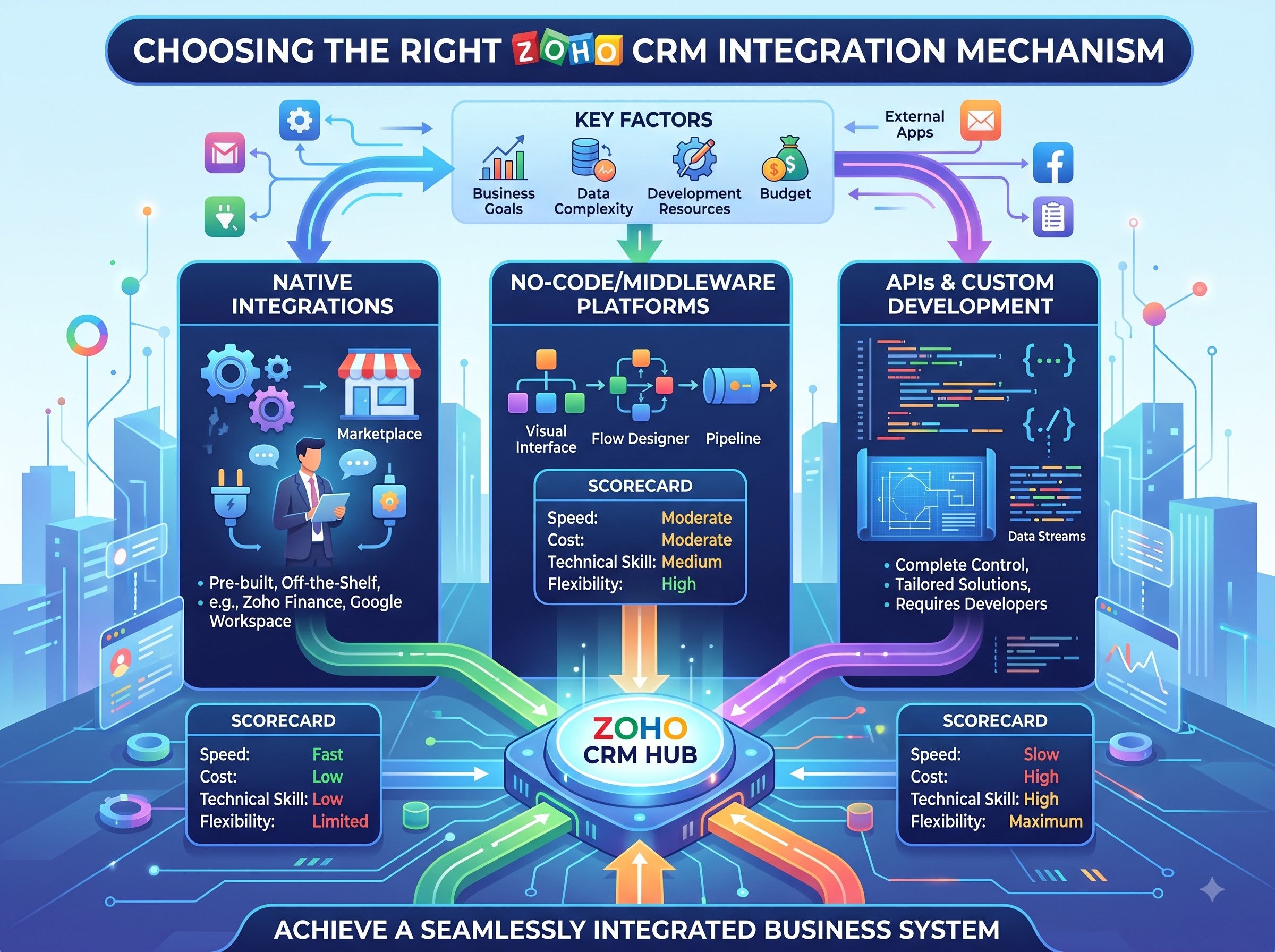
Zoho provides several ways to connect CRM processes. Workflow rules can initiate actions when records meet defined conditions. Webhooks and custom functions can call connected services. Zoho Flow can orchestrate app-based triggers, schedules, webhooks, actions, and logic. For deeper implementations, Zoho CRM’s current V8 developer platform includes REST APIs for core records, bulk processing, composite calls, queries, metadata, and notifications.
The Notification APIs can send near-real-time callbacks for selected create, update, or delete events, including field-specific conditions. They require identity lifecycle management: channels can expire, callbacks can be retried, and consumers must verify, deduplicate, monitor, and renew subscriptions. OAuth scopes should be limited to the modules and operations the integration actually needs.
Select the mechanism based on consequence and complexity. A simple notification may fit a low-risk alert. A cross-system order release needs stronger validation, idempotency, state management, reconciliation, audit evidence, and recovery. No-code and low-code tools accelerate delivery, but they do not remove the need for ownership or controls.
Design Rules That Keep Integrations Reliable
- Define system ownership field by field. Decide where customer, financial, delivery, support, and fulfillment states are mastered.
- Trigger on business-ready conditions, not convenient field edits. A stage name alone may be insufficient proof.
- Use stable external identifiers and idempotency controls so retries update rather than duplicate.
- Validate before writing. Required fields, reference data, authorization, and state transitions should be checked explicitly.
- Separate technical acceptance from business completion. A successful response does not prove the invoice, project, or shipment achieved its outcome.
- Create observable exception paths with owner, priority, evidence, remediation, and closure criteria.
- Protect access with least-privilege OAuth scopes, controlled connection identities, credential rotation, and appropriate logging.
- Plan for change. Field definitions, workflows, APIs, subscriptions, and connected applications evolve.
Common Failure Patterns
Most integration failures are operating-model failures expressed through technology. Teams synchronize too much data, leave ownership ambiguous, trigger too early, ignore duplicate handling, or treat errors as a developer-only concern. They may also build one-way automation that creates downstream work but never confirms acceptance or outcome.
Another common mistake is automating a broken handoff exactly as it exists. If discount authority is unclear or product codes do not align, faster transfer simply scales inconsistency. Start by defining the business decision, required evidence, authoritative state, and exception owner; then automate the path.
How Business Ops Center Supports Zoho CRM Customers
BOC helps organizations turn Zoho CRM events into controlled operational commitments. It sits across the process, connecting commercial intent with authority, workflow, evidence, execution, exception management, reconciliation, and improvement. The objective is not to replace Zoho CRM, Zoho Books, Zoho Projects, Zoho Desk, Zoho Flow, or the specialized systems that perform the work. It is to make the cross-system process governable.
- Map the customer lifecycle and prioritize integration opportunities by value, risk, and handoff friction.
- Define event contracts, data ownership, approval gates, identifiers, and downstream acceptance criteria.
- Coordinate standard Zoho capabilities with APIs and external systems where deeper control is required.
- Provide an operating view of commitments, exceptions, owners, evidence, and outcomes across applications.
- Create a reusable integration pattern that can expand from one lifecycle moment to the next.
A Practical Starting Point
Choose one high-friction, measurable handoff—often approved quote to finance, closed-won to project creation, or customer activation to support. Document the current delay, rework, errors, and ownership gaps. Define the minimum data contract, authoritative systems, approval evidence, exception path, and success measures. Then implement the flow with monitoring and reconciliation from the beginning.
| If your Zoho CRM pipeline still depends on people to rekey customer data, chase approvals, create downstream work, and confirm outcomes, Business Ops Center can help design a governed integration path. Start with one commercial milestone and turn it into a reliable, measurable operating workflow. |