
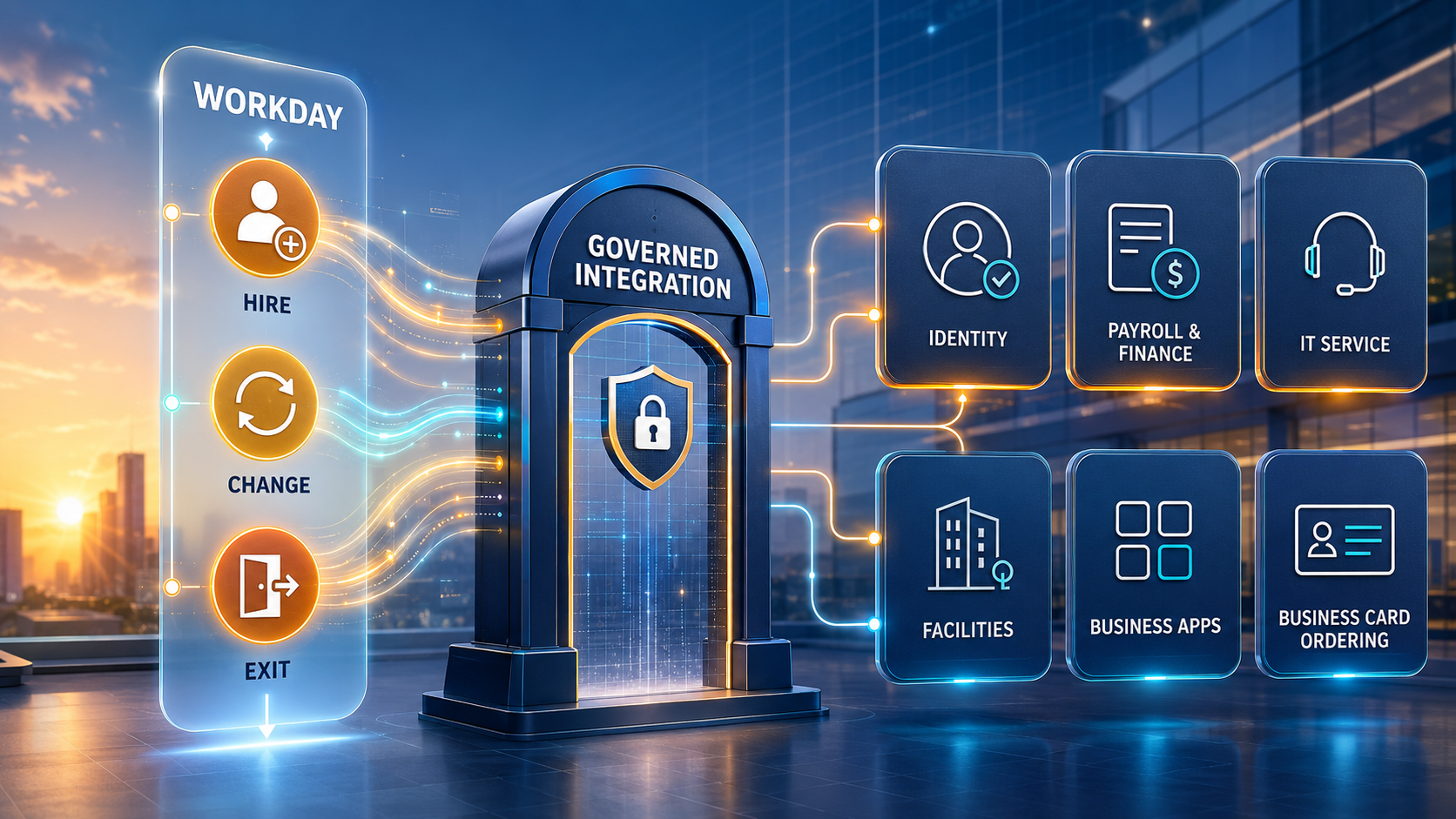
| EXECUTIVE PREMISE: Workday can define a trusted workforce event, but enterprise value appears only when identity, payroll, finance, facilities, service, business applications, and fulfillment act on that event correctly. BOC governs the cross-system mandate, exception, evidence, and outcome. |
A Workforce Event Is An Enterprise Operating Event
Hiring a worker is not only an HR transaction. It can require an identity, email account, device, software access, payroll setup, cost-center assignment, workspace, security training, purchasing authority, business cards, and manager acknowledgement. A transfer can change access, approval limits, reporting relationships, budgets, and physical location. A termination can require immediate access removal, asset recovery, final pay, knowledge transfer, records retention, and evidence that every obligation was completed.
When these actions depend on tickets, spreadsheets, and email, the enterprise creates delay and risk at the moments when people, money, authority, and access are changing. Teams may not agree on the effective date. A downstream system may receive an incomplete record. An application owner may close a task without proving the intended state. HR sees the business process as complete while operational obligations remain open.
A well-designed Workday integration strategy treats approved workforce changes as governed business events. Workday remains authoritative for appropriate worker and organizational states. Connected systems perform their specialized work. Business Ops Center (BOC) coordinates the release conditions, ownership, evidence, exceptions, operational reconciliation, and closure across the lifecycle.
The Highest-Value Workday Integration Moments
The goal is not to copy every worker field everywhere. It is to connect consequential events to the systems that must act, using the minimum necessary data and clearly defined authority.
| Workforce event | Connected action | Primary destination | Control question |
|---|---|---|---|
| Candidate hired | Create onboarding obligations | Identity / IT / Payroll | Is the hire approved and effective? |
| Worker starts | Activate access and services | Enterprise applications | Is role-based access ready? |
| Role changes | Adjust access and authority | IAM / Finance / CRM | What must be added or removed? |
| Location changes | Update tax, facilities, and fulfillment | Payroll / Workplace | Which effective date governs? |
| Leave begins | Suspend or delegate selected duties | IAM / Operations | What access and authority remain? |
| Worker exits | Revoke, recover, retain, and settle | IT / Payroll / Legal | Can every obligation be proven? |
| Outcome closes | Reconcile status and evidence | BOC / Analytics | Does actual state match intent? |
1. Connect Workday to Identity and Access Management
Identity integration is one of the most valuable and sensitive workday opportunities. A hire, transfer, promotion, leave, or termination can change which accounts a person requires, which roles are appropriate, who approves their work, and when access must begin or end. The integration should translate workforce attributes into controlled identity actions without allowing the HCM record to become a substitute for application-specific authorization decisions.
A governed flow establishes the worker identifier, worker type, status, organization, manager, location, job profile, and effective dates required by identity systems. Role mappings should be explicit and reviewable. High-risk or privileged access should require additional approval. Teams must remove obsolete access as deliberately as they add new access when a worker changes jobs.
- Use immutable identifiers rather than names or email addresses as integration keys.
- Apply least privilege and distinguish birthright access from request-based access.
- Honor future-dated events and prevent premature provisioning or revocation.
- Reconcile the intended access state with actual application accounts and roles.
| BOC OPPORTUNITY: BOC can connect the approved workforce event to identity decisions, owners, exceptions, attestations, and verified outcomes. Completion means the required access state exists—not merely that a provisioning message was sent. |
2. Connect Workday to Payroll, Finance, and Expense
Workforce and finance processes intersect through legal entity, cost center, location, compensation, time, benefits, expenses, purchasing authority, and project assignment. Some organizations use Workday for both HCM and financial management; others connect workday to external payroll, ERP, banking, tax, or expense platforms.
The integration must preserve effective dating and business meaning. A compensation change approved today may apply next pay period. A transfer may move labor cost while leaving selected project duties in place. A contingent worker may require expense access but not payroll. The flow should validate reference data, legal-entity context, currency, pay group, cost allocation, and downstream acceptance before treating the event as complete.
- Separate sensitive compensation and payroll data from general workforce attributes.
- Define which system owns financial reference data and which consumes it.
- Route mismatched cost centers, pay groups, or legal entities to accountable owners.
- Reconcile totals and populations, not only individual successful messages.
3. Connect Workday to IT Service and Asset Operations
A new worker may need a laptop, mobile device, software, security keys, network access, and support coverage before the start date. A role or location change may require a different device, software set, or support group. A departure requires asset recovery, data preservation, account closure, and evidence that exceptions were resolved.
Workday can trigger a governed onboarding or offboarding package in an IT service-management platform. The package should include only the necessary workforce context, create linked tasks with clear owners and due dates, and return durable request or asset references. A team should not automatically treat a completed ticket as proof that it delivered, configured, acknowledged, or recovered a device.
This is where BOC adds an enterprise operating view. HR, IT, security, finance, facilities, and the manager can retain their specialized systems while leadership sees the collective obligation, blocked items, exceptions, and verified readiness.
4. Connect Workday to Business Applications
Workforce changes affect CRM, ERP, project, collaboration, support, analytics, and industry-specific applications. A sales hire may need a territory, quota, CRM role, email group, and approval path. A project leader may need resource assignments and financial authority. A service employee may need queues, skills, schedules, and customer entitlements.
Avoid building a unique point-to-point integration for every application when the same workforce event and governance pattern can be reused. Define a canonical event contract containing the worker identifier, event type, effective date, relevant organizational attributes, correlation ID, and required outcome. Each destination can then translate that contract into its own controlled action.
Application owners should determine role semantics and segregation requirements. Workday provides authoritative workforce context; it should not silently grant every downstream permission based on a job title alone.
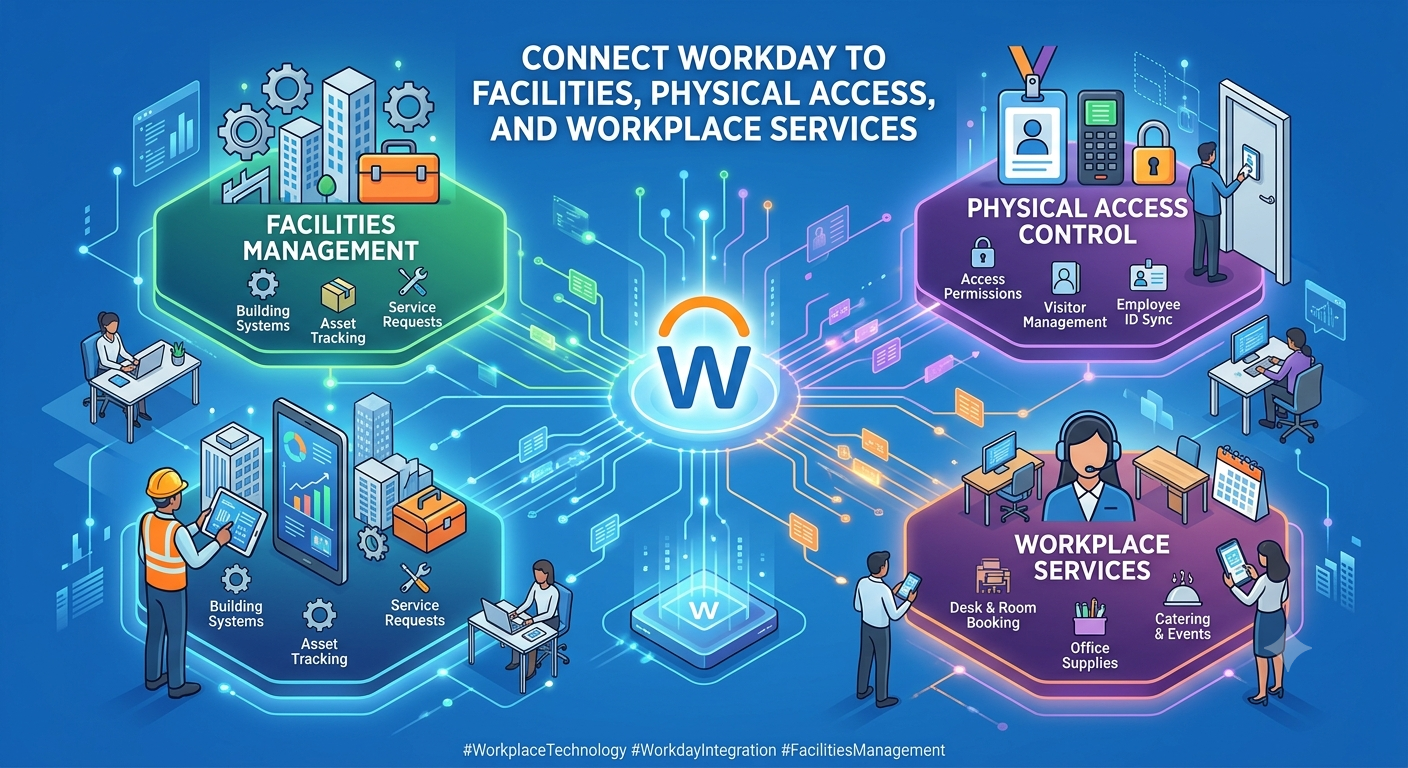
5. Connect Workday to Facilities, Physical Access, and Workplace Services
Work location, schedule, worker type, and effective dates can drive badges, office access, seating, parking, equipment, safety requirements, and local services. Physical access deserves the same discipline as digital access. A worker should not enter a restricted area merely because a generic onboarding task was completed.
The integration should account for remote, hybrid, multi-site, temporary, and contingent arrangements. Sensitive facilities details should remain in the appropriate system. Workday needs only the resulting status required for lifecycle coordination, while BOC can track exceptions such as missing safety clearance, delayed badge production, or an unrecovered credential.
6. Connect Workday to Business Card Ordering
Business card ordering is a practical example of a workforce event becoming governed fulfillment. A hire, name change, title change, location change, promotion, or brand assignment may create a need for new cards. Manual ordering forces employees or administrators to rekey identity and organizational data, increasing errors and bypassing authorization.
A Workday integration can pass approved, publication-ready identity attributes and the effective organizational context into Color Card Administrator and Business Card Manager. CCA can govern which identity, title, location, brand, and ordering authority are valid. BCM can execute card configuration, ordering, production, shipment, and status tracking. BOC coordinates the workforce trigger, decision, exception, evidence, and final reconciliation across the process.
- Trigger only after the relevant workforce change is approved and effective.
- Share only fields required for card creation and fulfillment.
- Prevent duplicate or premature orders through correlation and idempotency controls.
- Return order, production, shipment, delivery, and exception status to the governed workflow.
Choosing the Right Workday Integration Mechanism
Workday provides multiple mechanisms for different integration needs. Packaged connectors address common third-party scenarios. Enterprise Interface Builder (EIB) supports simpler integrations without programming. Workday Studio supports sophisticated integrations that teams can launch, schedule, and audit. Orchestrate for Integrations provides a visual builder for integrations with external systems and supports custom logic, third-party APIs, and complex patterns. Workday APIs include REST, SOAP, reporting, query, and other interfaces for appropriate use cases.
Choose based on event frequency, volume, latency, sensitivity, transformation, policy orchestration, recoverability, and ownership. A nightly population file is different from an immediate termination event. An interactive Extend application is different from a high-volume integration. Workday’s developer guidance notes that Extend apps are intended for lower-volume interactive transactions and directs teams toward appropriate integration approaches for large imports and exports.
Newer data-cloud capabilities may expand governed access to Workday data across analytics and cloud platforms, but availability must be confirmed. In 2026, Workday described Data Cloud capabilities and AWS integration as early-access or planned for later availability. Enterprises should not design production commitments around announced features without verifying tenant eligibility, regional availability, licensing, and current documentation.
The Governed Workforce-to-Operations Lifecycle
- Detect: Workday records an approved hire, change, leave, contingent-worker, or termination event.
- Validate: Required identity, organization, effective date, worker type, and authority are confirmed.
- Classify: Rules determine which operational obligations apply to the event and population.
- Approve: High-risk access, spend, exceptions, and special fulfillment receive authorized decisions.
- Execute: Identity, payroll, IT, facilities, applications, and fulfillment systems act.
- Acknowledge: Each destination returns a durable reference and acceptance state.
- Monitor: Delays, rejects, duplicates, and missing evidence become visible, owned work.
- Reconcile: Intended workforce and authority states are compared with actual downstream states.
- Close: The process ends only when outcomes are verified, and residual obligations are governed.
Design Rules for Reliable Workday Integrations
- Define system ownership field by field, including effective-dated and derived attributes.
- Minimize shared data and protect compensation, benefits, demographic, and personal information.
- Use stable worker, position, organization, and event identifiers across systems.
- Design for future-dated, corrected, rescinded, retroactive, and overlapping events.
- Make integrations idempotent, so retries do not create duplicate accounts, tickets, or orders.
- Separate technical delivery, business acceptance, and verified completion.
- Give every exception an owner, priority, evidence, remediation path, and closure condition.
- Test security, population coverage, scheduling, dependencies, and recovery during Workday releases.
Common Failure Patterns
The most common failure is treating the worker record as a flat, current-state profile. Workday can process transactions using effective dates and correct or rescind them. An integration that ignores timing can activate access early, retain access too long, send the wrong location, or create duplicate downstream work.
Other failures include matching by email, exporting excessive personal data, granting access directly from job titles, closing onboarding when tickets are merely created, and hiding failures in technical logs. A successful file transfer or API response is not the same as an employee who is ready, a former worker whose access is removed, or an asset that has been recovered.
How Business Ops Center Supports Workday Customers
BOC helps enterprises govern the operating layer around Workday. It does not replace Workday HCM, Financial Management, Integration Cloud, Extend, Orchestrate, Studio, EIB, identity platforms, service-management systems, payroll providers, or fulfillment applications. It connects their decisions and outcomes.
- Map workforce events to cross-functional obligations, owners, evidence, and outcomes.
- Define integration contracts, release conditions, identifiers, security, and acceptance criteria.
- Coordinate exceptions that cross HR, IT, finance, facilities, security, and application teams.
- Reconcile intended workforce states with actual access, service, asset, financial, and fulfillment states.
- Create a reusable governance pattern that scales across lifecycle events and destinations.
A Practical Starting Point
Start with one measurable workforce event—usually new-hire onboarding, role change, or termination. Inventory every downstream obligation, current delay, rework, security exposure, and ownership gap. Define the authoritative event, effective-date rules, minimum data contract, approval gates, destination acknowledgements, exception path, and outcome measures. Build reconciliation into the first release.
| If Workday records workforce change but your enterprise still relies on spreadsheets and emails to provision access, create services, recover assets, update authority, and confirm fulfillment, Business Ops Center can help turn that event into a governed, measurable operating workflow. |