

Connecting Teams, Microsoft Graph, CRM, HCM, APIs, CCA, BCM, and enterprise systems without weakening operational control.
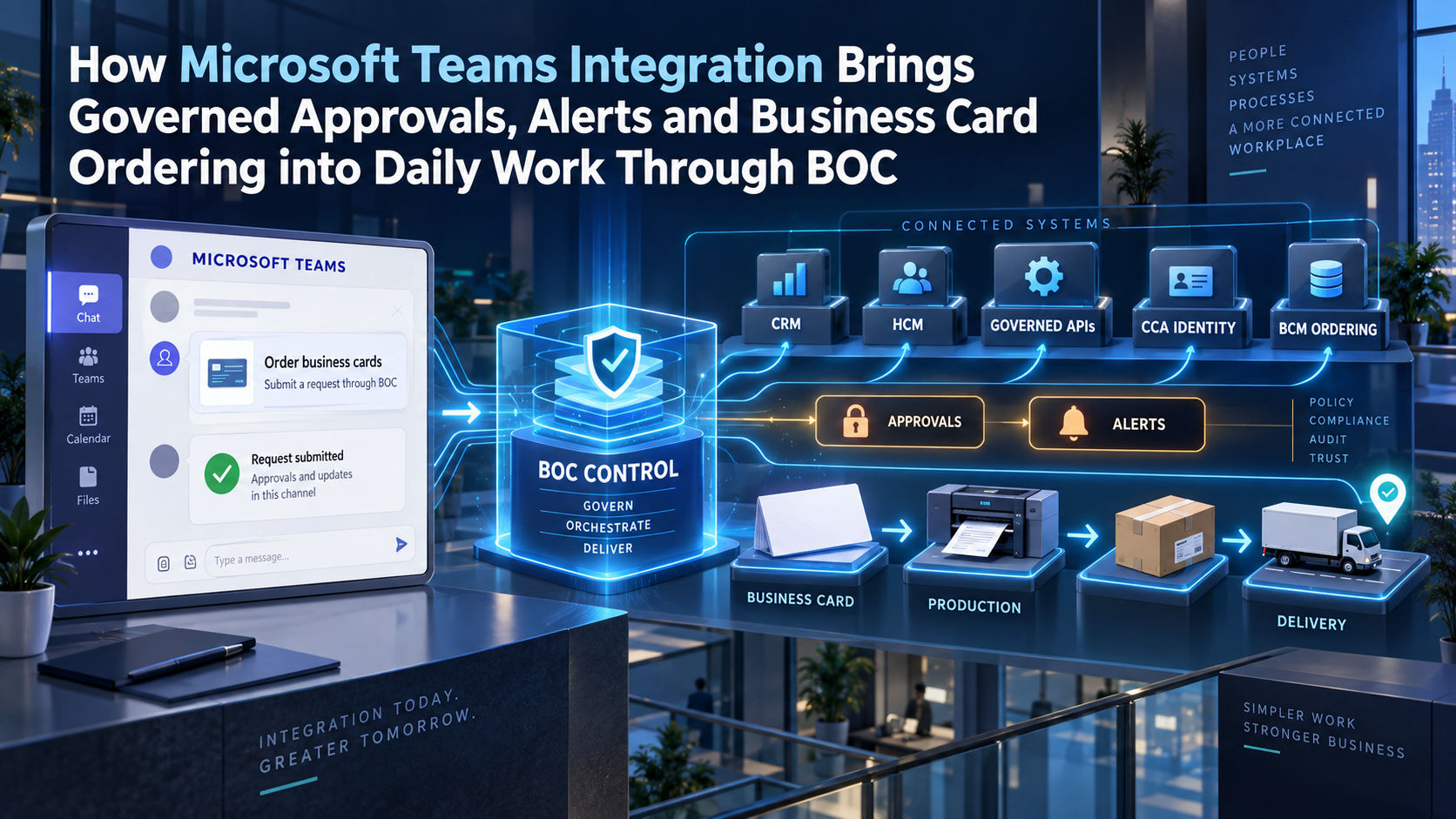
Microsoft Teams can make operational work easier to see and act on, but it should not become the authority for customer data, workforce identity, approvals, purchasing, or fulfilment. BOC turns Teams interactions into governed enterprise cases, validates CRM and HCM context, controls API execution, and coordinates CCA and BCM business card ordering through verified delivery and evidence-backed closure.
Teams Becomes an Enterprise Work Surface Through BOC
Employees already spend much of their day in Microsoft Teams. They receive messages, join meetings, review files, coordinate customer work, and ask colleagues for decisions. The integration opportunity is to bring selected operational actions into that familiar environment while preserving the authority of CRM, HCM, finance, service, identity, procurement, HR, and fulfilment platforms.
Business Ops Center provides the missing control layer. A CRM opportunity, HCM workforce event, failed API transaction, service escalation, or business card request creates a BOC case. BOC retrieves authoritative facts, evaluates policy, chooses the permitted Teams experience, records the response, invokes downstream APIs, monitors execution, and returns a safe status to the user.
Teams is therefore the interaction surface, not the system of record. The distinction lets an employee approve, acknowledge, request correction, or open a governed case without relying on a chat message as the only evidence that a business decision occurred.
Collaboration Convenience Must Not Become Business Authority
A Teams message is designed for communication. It may be edited, deleted, forwarded, copied, retained under a particular policy, or viewed by a changing audience. Channel membership, guest access, private chats, shared channels, and app permissions affect who can see and act. These characteristics make Teams valuable for collaboration but insufficient as the sole record for a material approval.
BOC separates the visible interaction from the controlled business record. The user, tenant, team or chat, message, action, timestamp, case version, and response are correlated with the source data, applicable policy, approver authority, API result, exception history, reconciliation, and closure evidence.
The design principle is clear: Teams can inform, request, and confirm; BOC governs; enterprise applications record. A convenient button does not override current employment status, approval limits, segregation of duties, customer ownership, budget, brand rules, or supplier controls.
Microsoft Teams and Graph Enable Event-Driven Operations
It supports Teams applications with capabilities such as bots, tabs, message extensions, cards, and notifications. The Microsoft Graph exposes APIs for Teams and wider Microsoft 365 resources, subject to the selected permissions and usage model. Workflows, webhooks, or proactive bot messages can also introduce external events into Teams, but the right mechanism depends on audience, interactivity, administration, security, and lifecycle requirements.
A BOC implementation chooses the smallest appropriate surface. An activity notification can direct a user to a governed experience. A bot can present an Adaptive Card and process a response. A tab can expose a richer case. A workflow can post an enterprise operational analytics notice. BOC keeps the policy and business state outside the message so the collaboration layer remains replaceable and manageable.
This matters because Microsoft 365 connector patterns are changing. New designs should be based on current Microsoft guidance and should avoid hard-wiring critical operations to a legacy posting mechanism. App ownership, workflow co-ownership, permissions, tenant policy, and operational monitoring are part of the architecture.
The Governed Teams Workflow Lifecycle
| Lifecycle stage | Authoritative context | BOC control | Required outcome |
|---|---|---|---|
| Business event | CRM HCM ERP service finance or monitoring record | Authenticate, correlate, classify, and validate | Trusted operational case |
| Teams notice | Approved audience summary deep link and action surface | Minimize data and bind message to case | Useful contextual notification |
| User response | Verified Microsoft identity action and timestamp | Recheck authority state and case version | Valid request or decision |
| Execution | Authoritative platform API and business rule | Invoke permitted idempotent action | Controlled downstream change |
| Exception | Failure conflict missing data timeout or policy boundary | Assign owner, deadline, escalation, and recovery | Owned resolution path |
| Evidence | Source decision API response status and reconciliation | Preserve traceability outside Teams | Auditable outcome |
| Card ordering | HCM CRM CCA BCM supplier and delivery records | Govern eligibility identity, product, and fulfilment | Approved card delivery |
CRM Integration Brings Customer Decisions into Teams
A CRM event can signal a qualified opportunity, pricing exception, renewal risk, customer escalation, contract milestone, territory change, or closed deal. BOC retrieves the account, opportunity, owner, stage, value, customer status, entitlement, and relevant obligations. It then presents the authorized user with the minimum context needed to act.
Teams may offer actions such as acknowledge, assign, request review, approve within limit, or open the full BOC case. Before execution, BOC rechecks the CRM record and the user’s authority. If the opportunity changed after the card was issued, the action can expire or refresh rather than apply an outdated decision.
After an approved response, BOC invokes the designated CRM, ERP, billing, project, service, or fulfilment API, records the result, and posts an appropriate status. Free-form chat does not silently rewrite master data. A request that needs interpretation becomes a governed case with validation and confirmation.
HCM Integration Governs Workforce Events and Access
HCM remains authoritative for joiners, movers, leavers, managers, titles, locations, departments, legal entities, employment status, and effective dates. BOC interprets these changes and coordinates the required identity, access, equipment, facilities, communications, CRM assignment, and business card tasks. Teams informs the people who must act.
Sensitive workforce details should be minimized. A channel rarely needs a complete employee profile. BOC sends only the information needed for a decision and directs users to a controlled surface when additional review is required. Microsoft Dynamics 365 integration and Teams membership are useful context, but neither substitutes for current HCM status or delegated approval authority.
Effective dating is equally important. Future changes can be scheduled without premature execution. If the source event is corrected or cancelled, BOC updates the case, invalidates stale Teams actions, and recalculates dependent work.
Business Card Ordering Fits Naturally into Teams
A manager, employee, HR partner, sales leader, or office administrator can begin or approve a business card request from Teams. The request may originate from an HCM joiner or mover, a CRM territory or customer-facing role, a conference assignment, a depleted quantity, or a verified replacement need. BOC correlates the request with the triggering record rather than treating a message as sufficient evidence.
BOC verifies active employment, effective date, manager, title, location, legal entity, territory, customer-facing need, cost center, quantity, prior orders, delivery address, required date, and the authority of the person acting. Missing or conflicting facts are routed to the responsible HR, CRM, brand, procurement, facilities, or finance owner.
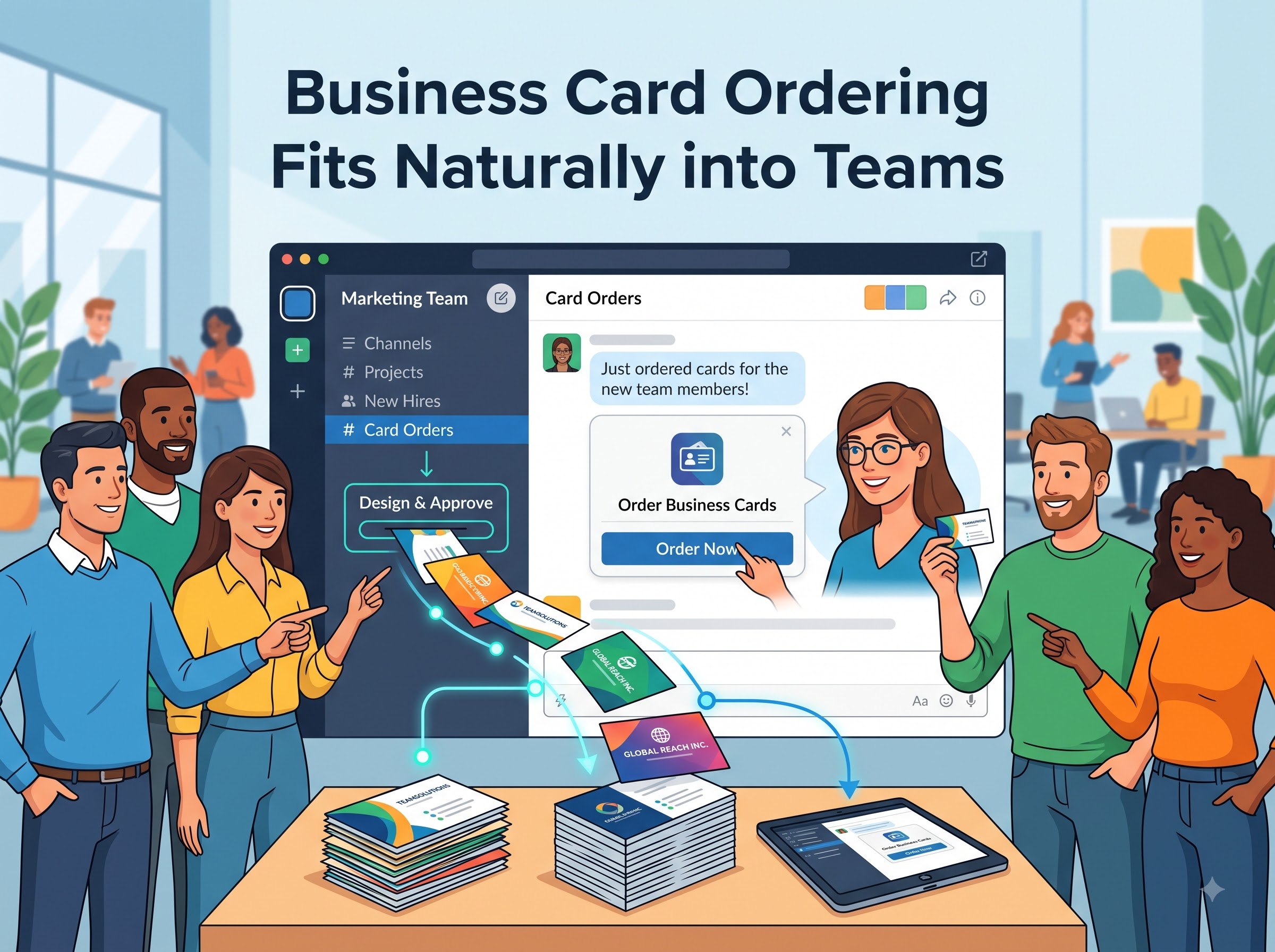
Teams shows a concise, privacy-aware summary and current status. Approval actions expire when the employee, role, policy, quantity, template, destination, or case version changes. The requester receives useful progress without gaining the ability to bypass identity, purchasing, or production controls.
CCA and BCM Keep Printed Identity and Fulfilment Controlled
Color Card Administrator is the authority for the identity approved for print: name, title, company, office, phone, email, language, legal text, brand, logo, and template. CCA returns a versioned decision. Teams can present a preview or link, but casual edits in chat do not become production data.
Business Card Manager converts the approved CCA identity into a controlled product order. BCM applies card type, stock, finish, quantity, proof, supplier, price, shipping, and production rules. BOC sends the approved package, monitors acknowledgements and milestones, and coordinates cancellation, correction, replacement, and reorder paths.
The Teams experience can report awaiting information, awaiting approval, approved identity, released to BCM, in production, shipped, delivered, or exception assigned. The complete record links the HCM or CRM trigger, Teams response, approver, CCA version, BCM order, supplier result, delivery evidence, and cost treatment.
Adaptive Approvals Need Strong Decision Design
Adaptive Cards can make a decision clear and convenient, but the workflow must define who may approve which employee, legal entity, amount, quantity, product, exception, and risk. BOC evaluates delegation, temporary authority, absence, separation of duties, approval thresholds, and any need for a second reviewer.
The action surface should identify the object, proposed outcome, material context, consequence, and expiry. BOC binds the response to a user, case, and version; checks the request is still active; prevents repeat execution; and records the policy and evidence used. High-risk decisions can route to a stronger enterprise surface while Teams continues to guide the user.
This model avoids approval theatre. A click is only one signal. A valid enterprise HR systems decision also needs authenticated identity, current authority, authoritative data, understandable context, a controlled action, and verifiable execution.
Operational Alerts Must Produce Owned Resolution
A useful alert identifies the affected business object, impact, severity, owner, expected response, and recovery path. Posting every API error into a busy channel creates noise and encourages teams to mute the very feed intended to protect operations.
BOC groups related events into a case, suppresses duplicates, applies materiality, enriches the notice with source context, and chooses the correct user, chat, channel, or application surface. Acknowledgement establishes ownership but does not close the issue. Closure requires the expected downstream state and evidence.
Escalation can follow elapsed time, customer impact, financial exposure, workforce risk, regulatory relevance, or repeated failure. The Teams message remains a useful window into progress while BOC owns timers, assignments, recovery, reconciliation, and final closure.
Security Permissions and Lifecycle Controls Are Mandatory
Teams and Microsoft Graph integrations require carefully selected delegated or application permissions, appropriate consent, secure credentials, and tenant-aware administration. BOC applies least privilege, separates environments, protects secrets and certificates, validates inbound requests, controls service identities, and monitors authorization changes.
The design must consider app installation, policy restrictions, channel and chat scope, guest and external access, user departure, team archival, workflow ownership, credential expiration, throttling, retries, and service availability. An app that posts successfully in a test channel is not yet an operationally supportable enterprise integration.
Logs should preserve case identifiers, relevant source versions, user and application identity, timestamps, action results, errors, and reconciliation evidence without copying unnecessary chat or personal data. Retention follows the authoritative business record and the applicable compliance policy.
Common Microsoft Teams Integration Failures
The most damaging failure is allowing Teams to become an unofficial system of record. Other failures include overbroad permissions, excessive information in channels, approvals without current authority checks, stale cards that remain actionable, duplicate execution, orphaned workflows, hard-coded owners, and success messages sent before the downstream transaction completes.
Organizations also underestimate lifecycle change. A user leaves, a team is archived, a channel becomes shared, a tenant policy changes, a certificate expires, or a connector approach is retired. Without ownership and monitoring, the workflow can fail silently or expose data to the wrong audience.
BOC reduces these risks by separating interaction from control, binding every response to a case version, revalidating source data, using idempotent actions, monitoring permissions and execution, reconciling target states, assigning exceptions, and preserving evidence outside Teams.
A Practical Microsoft Teams Integration Roadmap
Start with one recurring, high-friction workflow: a CRM commercial approval, customer escalation, HCM onboarding task, failed integration recovery, or business card order. Map the source event, record owner, Teams audience, user actions, authority rules, downstream API, exceptions, data-minimization needs, retention, and closure evidence.
Choose the appropriate Teams app capability and Microsoft Graph permissions. Implement identity mapping, request validation, fast response handling, durable queues, case correlation, deduplication, current-state checks, BOC policy, idempotent downstream actions, status updates, monitoring, reconciliation, and recovery. Test stale cards, repeat clicks, permission changes, user departure, team changes, throttling, timeouts, partial completion, and supplier exceptions.
Measure decision time, stale-action prevention, duplicate suppression, exception aging, downstream completion, evidence completeness, card-order readiness, proof correction, production time, and on-time delivery. Expand after the first workflow is controlled, supportable, and measurable.
BOC Creates a Reusable Collaboration Control Pattern
Teams own the collaboration experience. CRM owns customer and commercial records. HCM owns workforce facts. Finance, service, ERP, and operational platforms own their domain records. CCA owns approved printed identity. BCM owns business card conversion and fulfilment. BOC coordinates the governed decision and verified outcome across them.
A focused discovery engagement can define the event catalogue, source matrix, Teams app surface, Microsoft Graph permission model, authorization rules, data boundaries, API architecture, exception taxonomy, evidence model, enterprise business card governance policy, implementation backlog, and success measures.
Choose one Teams interaction that currently creates re-entry, delay, inconsistent decisions, unclear ownership, or weak traceability. BOC can turn it into a governed workflow while keeping daily work convenient and each enterprise system authoritative.
Questions Integration Buyers Should Ask
- Which Teams app capabilities, Microsoft Graph APIs permissions, and audiences support the workflow?
- Which systems own customer workforce, financial identity product, and fulfilment records?
- How are Microsoft identities mapped to current HCM status and approval authority?
- How are duplicate responses stale cards retries, throttling, and partial completion controlled?
- What information may appear in chats channels, notifications, and cards?
- Who owns app lifecycle workflow co-ownership credentials monitoring recovery retention and evidence?
Turn one Teams interaction into a verified enterprise outcome. Business Ops Center can connect Microsoft Teams with CRM, HCM, Microsoft Graph, finance, service, CCA, BCM, and other enterprise APIs while governing identity, authority, exceptions, evidence, and closure. Start with one approval, alert, onboarding task, or business card ordering workflow that currently depends on manual follow-up.